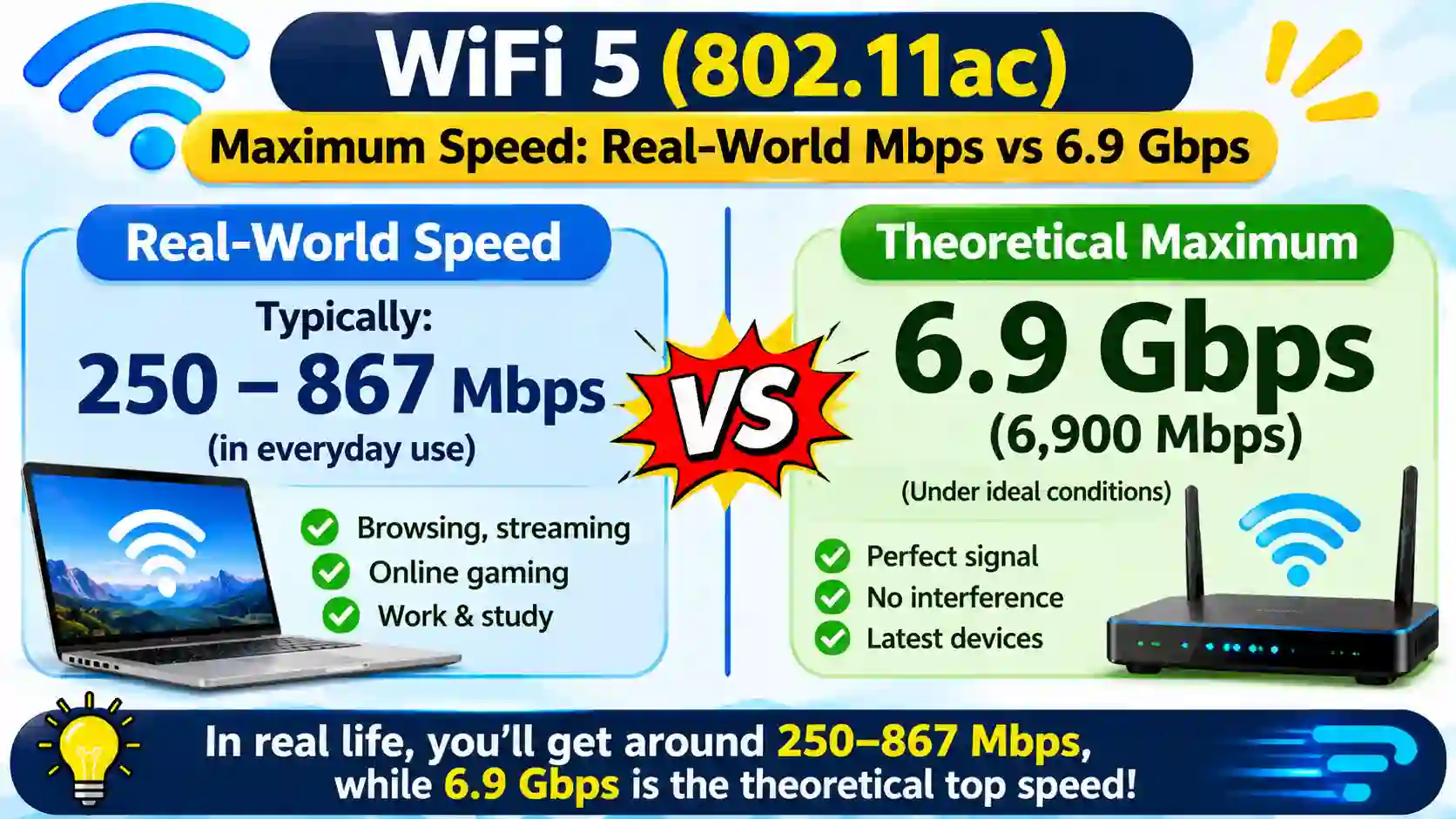
WiFi 5 Maximum Speed: Real-World Mbps vs 6.9 Gbps
If you have ever looked at a router box and seen a huge number like “AC1900” or “up to 6.9 Gbps”, you have probably wondered what that means for your own connection. The WiFi 5 maximum speed is impressive on paper, but the speed you actually get on a phone or laptop is a fraction of it. This guide explains where the big number comes from, what each type of device can really reach, and what you can do to get closer to it.
Quick Answer
- Theoretical maximum: The WiFi 5 maximum speed is 6.9 Gbps (6,933 Mbps), which needs 8 spatial streams and a 160 MHz channel. No consumer router or device uses this full setup.
- Typical device link speed: 433 Mbps (1×1) to 867 Mbps (2×2) on an 80 MHz channel. Most phones and laptops fall in this range.
- Real-world throughput: usually about 200 to 600 Mbps when you are close to the router with a clear signal. It drops quickly with distance, walls and interference.
In short, WiFi 5 is still fast enough for most homes, but you should treat 6.9 Gbps as a lab number, not a promise.
What Is WiFi 5 (802.11ac)?
WiFi 5 is the name the Wi-Fi Alliance gave to the IEEE 802.11ac standard. It was finalized in 2013 and became common in routers from around 2014 onward. It replaced WiFi 4 (802.11n) and was later followed by WiFi 6 (802.11ax) in 2019.
The biggest change from WiFi 4 is that WiFi 5 works only on the 5 GHz band. That band is less crowded than 2.4 GHz and supports much wider channels, which is the main reason WiFi 5 is so much faster than its predecessor. If a device says it supports “dual-band 802.11ac”, the 5 GHz side is the WiFi 5 part, and the 2.4 GHz side falls back to the older WiFi 4 standard.
WiFi 5 Maximum Speed: How 6.9 Gbps Is Calculated
The 6.9 Gbps figure is not a marketing guess. It comes from the standard itself, and you can reproduce it with three ingredients.
Channel Width, Streams and 256-QAM
Channel width. WiFi 5 supports 20, 40, 80 and 160 MHz channels. A wider channel carries more data, the same way a wider road fits more cars.
Spatial streams. The standard allows up to 8 spatial streams. Each stream is a separate data path between the router and the device, which is what the MIMO (multiple antennas) technology provides.
256-QAM modulation. This packs 8 bits into every signal symbol, which is a big jump from the 64-QAM used in WiFi 4.
Put together, a single stream on a 160 MHz channel reaches about 867 Mbps. Multiply that by 8 streams and you get the 6.9 Gbps maximum:
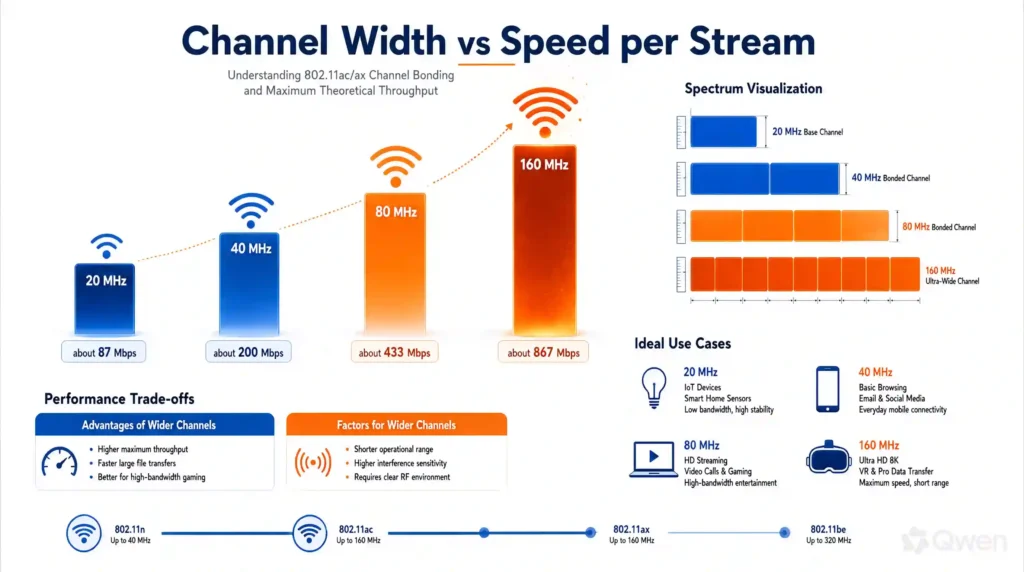
So 8 streams x 867 Mbps = roughly 6,933 Mbps, or 6.9 Gbps.
The catch is that very few products come close to this combination. Routers rarely have 8 antennas that are also usable for 160 MHz, and client devices almost never do.
Wave 1 vs Wave 2
WiFi 5 was rolled out in two phases, and they have different limits.
- Wave 1 (2013 to 2015): up to 80 MHz channels and up to 3 streams, for a maximum of about 1.3 Gbps. No multi-user MIMO.
- Wave 2 (2015 onward): adds 160 MHz channels (optional), up to 4 streams in most real products, and downlink MU-MIMO, which lets a router talk to several devices at once. Common Wave 2 routers advertise speeds like 1.7 Gbps, 2.6 Gbps or 3.5 Gbps.
To find the WiFi 5 maximum speed your own router can reach, check whether it is Wave 1 or Wave 2 first.
WiFi 5 Speed by Device Type
The speed you get is limited by the weaker side of the connection. A powerful router cannot push a phone past what the phone’s own antennas support. Here is what each setup can reach:
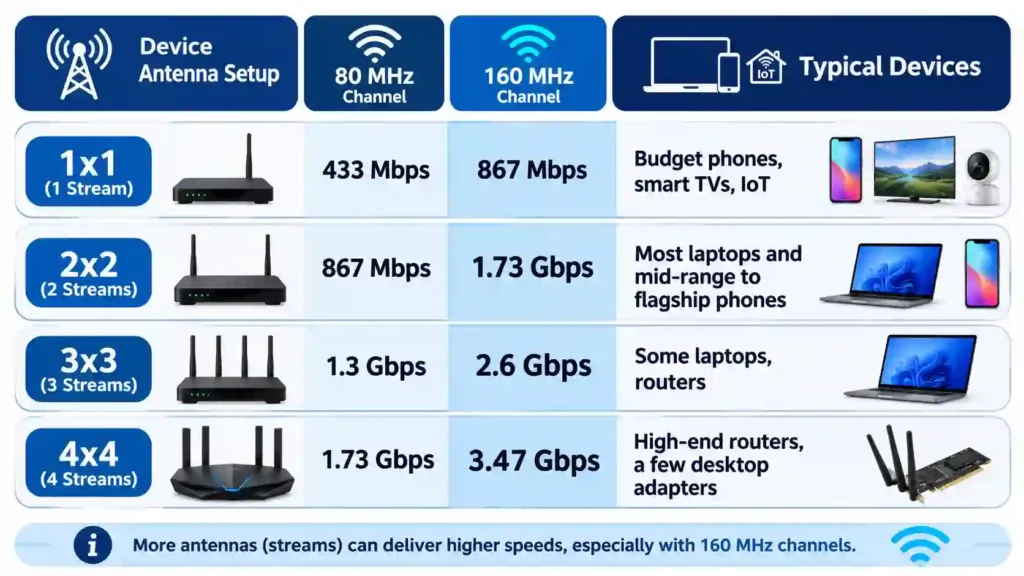
These are link speeds, which describe how fast the radio can talk, not how fast files download.
Router Speed vs Device Speed
The number on the router box, such as AC1200 or AC1900, is a combined total across bands and is often a simple sum of the 2.4 GHz and 5 GHz maximums. No single device will get that total. A 2×2 laptop connected to an AC1900 router will typically link at 867 Mbps on 5 GHz, and your actual download speed will be lower still.
WiFi 5 Real-World Speed
Link speed is the ceiling. Real throughput is what remains after signal overhead, interference, distance and the other devices sharing the airtime. As a general rule, real throughput lands somewhere around half to two-thirds of the link speed in good conditions.
Typical Speeds You Can Expect
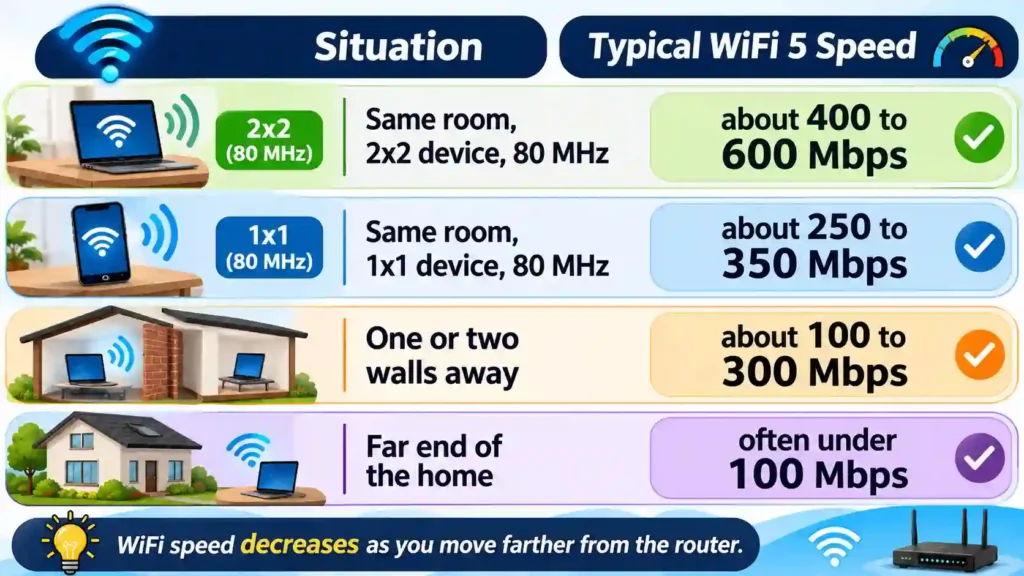
These are rough ranges, not guarantees. Your result depends on the router, the device, the building and your neighbors’ networks. The most reliable way to know your number is to test it yourself, which is covered below.
WiFi 5 Speed for Streaming, Gaming and Video Calls
Most everyday activities need far less than the maximum:
- 4K streaming: about 25 Mbps per stream.
- Online gaming: 10 to 25 Mbps is plenty; stable latency matters more than raw speed.
- Video calls: 3 to 10 Mbps per call.
- Large downloads and cloud backups: these are the tasks that benefit from higher speeds.
A household with several people streaming and gaming at once will rarely come near the limits of a good WiFi 5 router.
WiFi 5 Speed With Fibre and Broadband Plans
Your internet plan is the other half of the equation. If you pay for a 100 or 200 Mbps plan, WiFi 5 is almost never the bottleneck, because even a modest connection can carry that much. The wireless link starts to matter when your plan reaches roughly 500 Mbps to 1 Gbps. At that point a 1×1 device, a weak signal or an older Wave 1 router can hold you back, and wired Ethernet becomes the best way to use the full plan.
Why Is Your WiFi 5 Speed Slow?
If your WiFi 5 speed is far below what you expected, the cause is usually the setup rather than the standard. These are the most common reasons.
Distance and Walls
The 5 GHz band offers high speed but shorter reach. Concrete, brick, metal and even water (such as an aquarium) absorb the signal. Each wall can cut your speed noticeably, and the link rate steps down as the signal weakens.
Interference and Channel Width
In apartments and dense neighborhoods, many networks compete for the same channels. A 160 MHz channel is the most vulnerable, since it needs a wide clean slice of spectrum. In busy areas, a 80 MHz or even 40 MHz channel can perform more reliably than an unstable wide one.
Too Many Connected Devices
WiFi shares airtime. When many devices are active, each one gets a smaller slice. Wave 2 routers with MU-MIMO handle this better than Wave 1, but a crowded network still slows down, especially with older devices that transmit slowly and occupy the channel longer.
Connected to the Wrong Band
Many devices quietly join the 2.4 GHz network, which is limited to WiFi 4 speeds and is more congested. If your router uses a single network name for both bands, your device may choose 2.4 GHz even when 5 GHz would be faster. Check which band you are on.
Older or Limited Devices
A 1×1 phone or smart TV simply cannot exceed 433 Mbps on an 80 MHz channel, however powerful the router is. If your WiFi 5 speed is fine on other devices but slow on your laptop, the problem may be the laptop itself, so try our guide on how to fix a slow laptop.
Key Features Behind WiFi 5 Speed
Three technologies do most of the work in making WiFi 5 faster than WiFi 4.
MU-MIMO (Wave 2). Multi-user MIMO lets the router send data to several devices at the same time instead of serving them one by one. In WiFi 5 it works for downloads only, not uploads.
Beamforming. Instead of broadcasting evenly in all directions, the router focuses the signal toward each device. This improves signal strength and helps maintain speed at medium distance.
256-QAM. A denser way of encoding data into the radio signal, which raises the speed on strong, clean connections. It benefits you most when you are close to the router.
WiFi 5 vs WiFi 4 vs WiFi 6 Speed Comparison
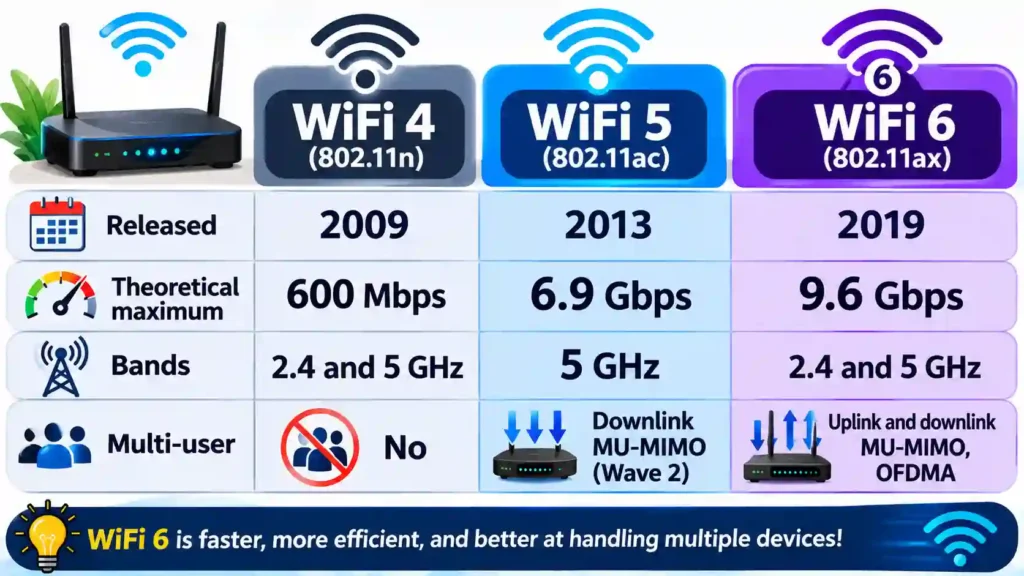
The maximum speed gap between WiFi 5 and WiFi 6 looks modest, but WiFi 6 is designed mainly to handle many devices more efficiently, not just to raise the top speed. On a quiet network with a few devices, the everyday difference is often small. WiFi 7 raises the theoretical ceiling much higher, but it requires new routers and new devices to benefit.
How to Get the Most Speed From WiFi 5
You do not need new hardware to improve most WiFi 5 connections. Try these steps in order:
- Move the router to a central, elevated, open spot, away from thick walls, metal and microwaves.
- Use the 5 GHz network for devices that support it, and give the bands separate names if your devices keep choosing 2.4 GHz.
- Pick a less crowded channel in the router settings, or set it to auto and restart.
- Choose the right channel width. Use 80 MHz for the best balance, and try 40 MHz if you live in a crowded building.
- Update the firmware on your router, and the Wi-Fi drivers on your laptop.
- Reduce the load: disconnect unused devices and pause large background downloads.
- Add a mesh system or access point if the far side of your home has a weak signal.
- Use Ethernet for desktops, consoles and TVs that stay in one place. It frees up airtime for everything else.
How to Check Your WiFi 5 Speed
Run a speed test near the router and again in the room where you use the connection most. Compare the two numbers, then check the connection details in your device’s Wi-Fi settings to see the link speed. If the test result is far lower than your internet plan, the wireless link is the likely cause. If it matches your plan, the plan itself is the limit.
Is WiFi 5 Still Enough in 2026?
For most households, yes. WiFi 5 handles 4K streaming, video calls, online gaming and normal browsing without trouble, and a good Wave 2 router still performs well.
It starts to feel limited in a few cases:
- Your internet plan is 500 Mbps or faster, and you want to use all of it wirelessly.
- Your home has a large number of smart devices and constant simultaneous use.
- You own many WiFi 6 or newer devices and want their full efficiency benefits.
If none of these apply, replacing a working WiFi 5 router will likely not change your daily experience much. If you do upgrade, look for WiFi 6 or newer, but also check the router’s real specifications rather than just the headline number.
Frequently Asked Questions
How many Mbps can Wi-Fi 5 handle? (How fast can Wi-Fi 5 go?)
The theoretical maximum is 6.9 Gbps, but most real devices link at 433 to 867 Mbps, and actual throughput is lower, often around 200 to 600 Mbps close to the router.
Is Wi-Fi 5 or Wi-Fi 6 faster?
Wi-Fi 6 is faster, with a theoretical maximum of 9.6 Gbps. In practice the difference is most noticeable when many devices are connected at once, because Wi-Fi 6 shares airtime more efficiently.
Why is Wi-Fi 5 so slow?
Slow speeds usually come from the setup, not the standard. Common causes are distance, thick walls, interference, a crowded network, being connected to the 2.4 GHz band, or using a device with only one antenna stream.
Is Wi-Fi 5 still good in 2026? Is it outdated?
Wi-Fi 5 is older, but it is still good enough for most homes. It is fine for streaming, calls and gaming unless you have a very fast internet plan or a large number of connected devices.
Can Wi-Fi 5 reach 1 Gbps?
On paper, yes. A 3×3 device on an 80 MHz channel or a 2×2 device on a 160 MHz channel can link at over 1 Gbps. Real-world downloads at that level are rare and need a strong signal and a fast internet plan.
Is Wi-Fi 5 enough for 4K streaming and gaming?
Yes. A 4K stream needs around 25 Mbps and gaming needs very little bandwidth, so a healthy Wi-Fi 5 connection handles both easily. A stable signal matters more than top speed.
How can I increase my Wi-Fi 5 speed?
Move the router to a central spot, use the 5 GHz band, choose a clean channel, update firmware, reduce the number of active devices and use Ethernet for fixed devices. A mesh system helps in larger homes.
Can Wi-Fi 6 devices connect to a Wi-Fi 5 router?
Yes. Wi-Fi is backward compatible, so a Wi-Fi 6 device will connect to a Wi-Fi 5 router. It will run at Wi-Fi 5 speeds and will not get Wi-Fi 6-only features such as OFDMA.
Conclusion
The WiFi 5 maximum speed of 6.9 Gbps is real, but only on paper. It needs 8 streams and a 160 MHz channel that almost no router or device combines. In everyday use, link speeds of 433 to 867 Mbps are normal, and real throughput is lower again.
The good news is that you rarely need more. Place your router well, stay on the 5 GHz band, keep the network uncluttered and test your speed where you actually use it. If your connection still falls short and you have a fast internet plan, that is the point where upgrading to WiFi 6 or newer starts to make sense.
