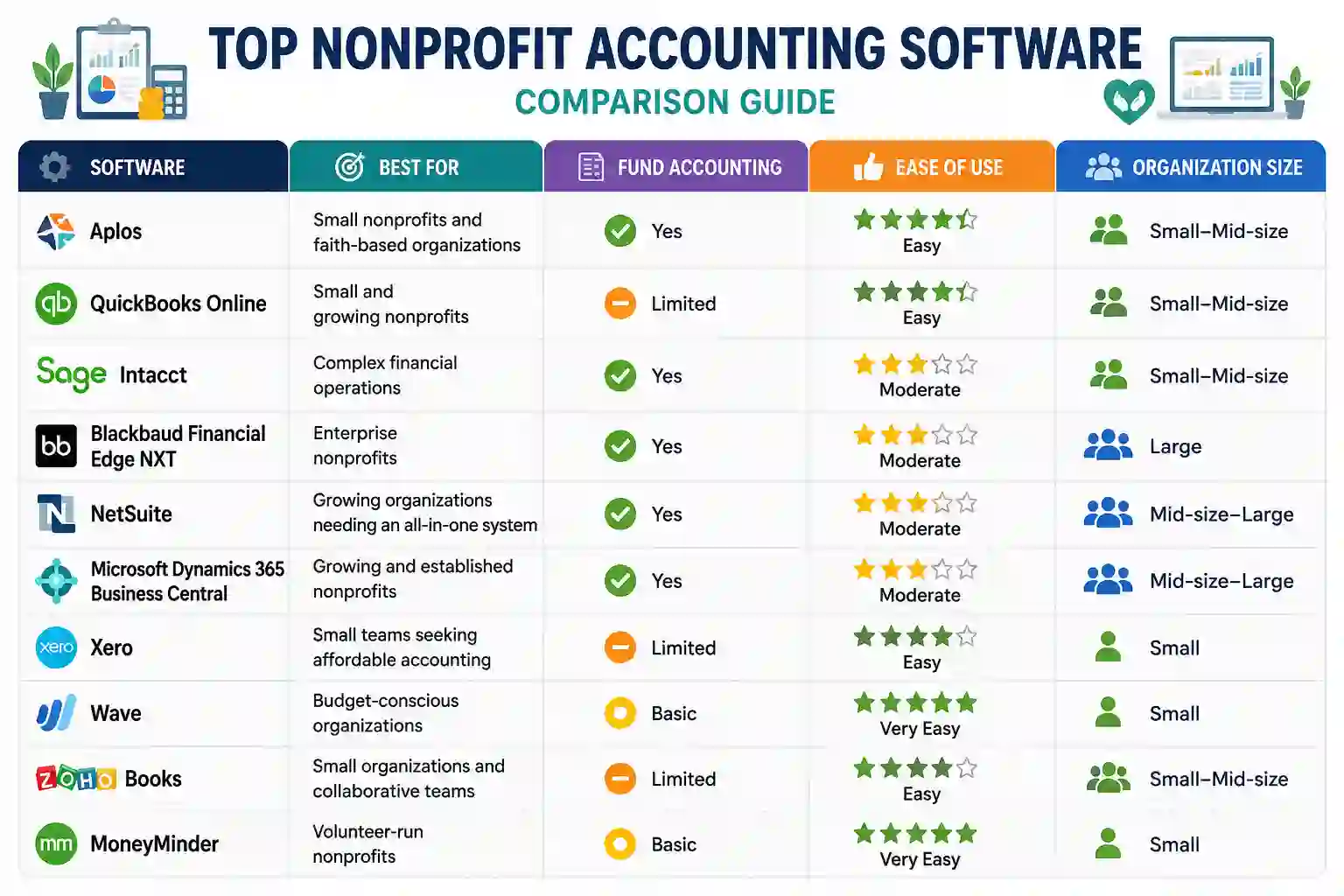
Quick Nonprofit Accounting Software Comparison can help you narrow down your options before looking at each platform in detail. The best choice depends on your nonprofit’s size, accounting needs, budget, and reporting requirements.
This table provides a starting point, but features and pricing can vary by plan. Nonprofits should evaluate whether a platform supports their specific accounting workflow, especially if they manage multiple funds, grants, restricted donations, or complex financial reports.
What Is Nonprofit Accounting Software?
Nonprofit accounting software is designed to help charitable organizations manage their finances, track funding, and prepare accurate financial reports. While standard accounting software can handle basic bookkeeping, nonprofit organizations often have additional requirements, such as tracking restricted and unrestricted funds, grants, donations, and program expenses.
The right accounting software can bring these activities into one system, making it easier to monitor income and expenses while maintaining clear financial records. It can also reduce manual data entry and simplify reporting for board members, donors, auditors, and other stakeholders.
Why Nonprofits Need Specialized Accounting Tools
Nonprofits need visibility into where their money comes from and how it is being used. For example, a grant may be restricted to a specific program, while general donations may be available for broader organizational expenses.
A suitable nonprofit accounting solution can help organizations:
- Track restricted and unrestricted funds
- Record donations and grant income
- Monitor program and operating expenses
- Create budgets and compare actual spending
- Generate financial statements and reports
- Maintain organized records for audits and compliance
For smaller organizations, a simple and affordable platform may be sufficient. Larger nonprofits with multiple programs, funding sources, or locations may benefit from more advanced fund accounting and reporting capabilities.
Key Features to Look for in Nonprofit Accounting Software
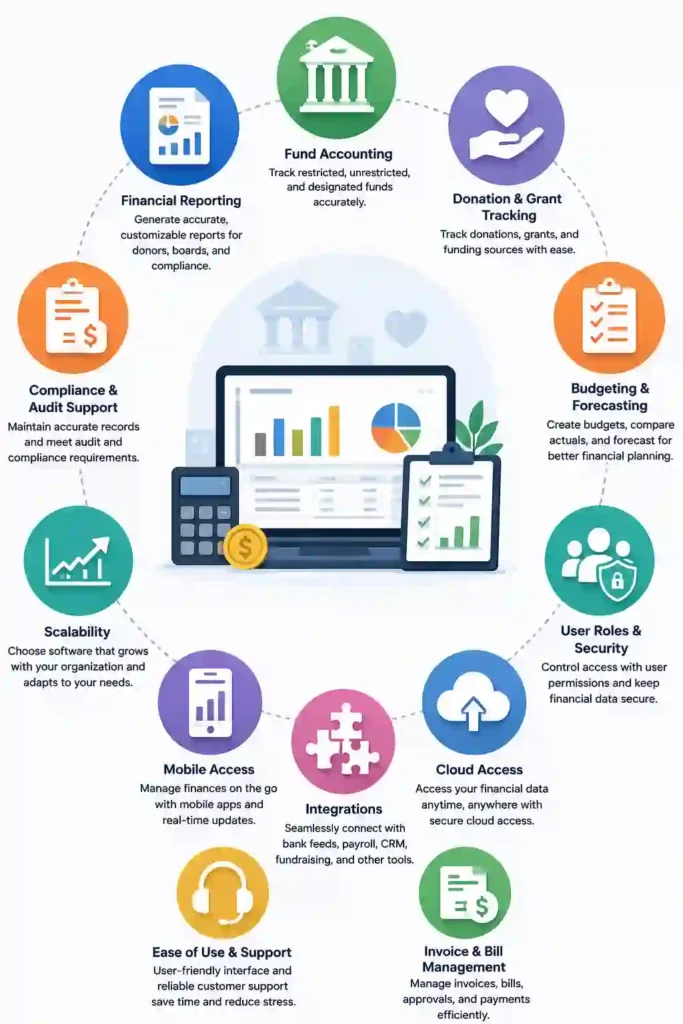
The best nonprofit accounting software should match the way your organization manages money, funding, and reporting. Before choosing a platform, focus on features that can reduce manual work and give your team a clear view of financial performance.
Fund Accounting software and Restricted Funds
Fund accounting is one of the most important requirements for nonprofits. It allows organizations to separate money according to its purpose or restrictions. This makes it easier to track whether grant or donation funds are being used according to their intended purpose.
If your organization manages several programs, grants, or restricted funds, prioritize software with strong fund accounting capabilities.
Donation and Grant Tracking
Nonprofits often receive money from multiple donors, foundations, and government programs. Software with donation and grant tracking can help record incoming funds, monitor restrictions, and connect funding with specific programs or projects.
Financial Reporting
Good reporting tools make it easier to understand your organization’s financial position. Look for software that can generate income statements, balance sheets, cash-flow reports, budget-versus-actual reports, and other nonprofit-specific reports.
Budgeting and Forecasting
Budgeting tools can help nonprofits plan future spending and monitor whether programs are staying within their allocated budgets. Forecasting features are especially useful for organizations managing recurring grants or multiple funding sources.
Integrations and Ease of Use Accounting software
Accounting software should work smoothly with the other tools your nonprofit already uses. Integrations with payment processors, payroll platforms, fundraising systems, banking services, or donor-management tools can reduce duplicate data entry.
Ease of use is equally important. A complicated system may provide advanced features but still create problems if staff and volunteers struggle to use it effectively.
Best Accounting Software for Small Nonprofits
Small nonprofits usually need accounting software that is affordable, easy to learn, and capable of handling essential nonprofit accounting tasks. A large enterprise platform may offer more features than a small organization actually needs, so choosing a solution that fits the team and budget can be more practical.
Aplos
Aplos is a strong option for small nonprofits that need nonprofit-focused accounting and fund management features. It can be particularly useful for organizations that want to track funds and generate financial reports without adopting a complex enterprise accounting system.
QuickBooks Online
QuickBooks Online is worth considering for small and growing nonprofits that want familiar bookkeeping tools and a broad ecosystem of integrations. However, organizations with more complex fund-accounting requirements should verify whether their chosen plan provides the nonprofit-specific functionality they need.
Money Minder
Money Minder can be a practical choice for smaller, volunteer-run organizations looking for straightforward financial management. Its simpler approach can make it easier for teams with limited accounting experience to maintain basic records and track organizational finances.
Wave
Wave may appeal to very small or budget-conscious organizations that primarily need basic accounting functionality. Before choosing it, nonprofits should confirm that its available features meet their requirements for fund tracking, reporting, donations, and other nonprofit-specific workflows.
Bottom line: The best accounting software for small nonprofits depends on the organization’s complexity. Aplos may be a better fit for nonprofit-specific accounting needs, while QuickBooks Online can suit organizations that want broader accounting functionality and integrations. Smaller volunteer-led groups may prefer a simpler option such as Money Minder.
Which Accounting Software Is Most Popular?
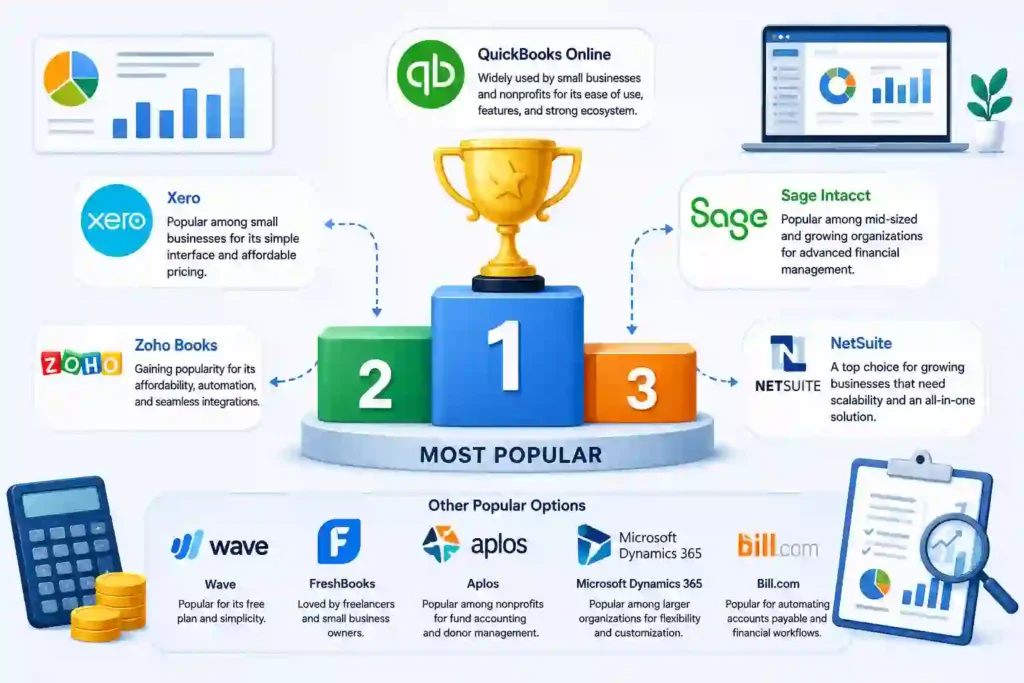
There is no single accounting platform that is the most used by every nonprofit. The right choice varies by organization size, budget, accounting complexity, and the features a nonprofit needs.
QuickBooks Online is a widely recognized option among small and growing organizations because it offers familiar bookkeeping tools, integrations, and different plans. However, popularity alone should not determine your choice. A platform that works well for a small nonprofit may not provide enough fund accounting or reporting capabilities for a larger organization.
For nonprofits with more complex financial operations, platforms such as Sage Intacct, Blackbaud Financial Edge NXT, NetSuite, and Microsoft Dynamics 365 Business Central may be more suitable. These systems are designed to support more advanced financial management and can scale as an organization grows.
When considering which is the most used accounting software, look beyond the number of users. Evaluate whether the software supports your nonprofit’s fund structure, reporting requirements, grants, integrations, and budget.
Ultimately, the most popular solution is not necessarily the best one for your organization. Fit, functionality, and scalability should matter more than popularity alone.
Best Accounting Software for Large Nonprofits
Large nonprofits typically have more complex financial requirements than small organizations. They may manage multiple programs, restricted funds, grants, departments, locations, and reporting requirements. As a result, the best accounting software for large nonprofits should provide strong financial controls, detailed reporting, scalability, and integration capabilities.
Sage Intacct
Sage Intacct is well suited to nonprofits that need advanced financial management and reporting. Its capabilities can support organizations with complex accounting structures, multiple funds, and detailed financial reporting requirements.
Blackbaud Financial Edge NXT
Blackbaud Financial Edge NXT is designed specifically for nonprofit financial management and can be a strong option for larger organizations that need to connect accounting with broader fundraising operations. It can help finance teams manage complex financial data while supporting nonprofit-specific reporting needs.
NetSuite Accounting Software
NetSuite can be a good fit for growing and large nonprofits looking for a broader financial management platform. Its scalability and integrated business-management capabilities make it more appropriate for organizations with complex operations than very small nonprofits.
Microsoft Dynamics 365 Business Central
Business Central can work well for established nonprofits that need scalable accounting alongside broader operational management. Its integrations and customization options can be valuable for organizations with more sophisticated workflows.
What Large Nonprofits Should Prioritize
When comparing software for a large organization, focus on:
- Multi-fund and multi-department accounting
- Grant and restricted-fund tracking
- Advanced financial reporting
- Budgeting and forecasting
- User permissions and financial controls
- Integrations with fundraising and operational systems
- Scalability as the organization grows
For larger nonprofits, choosing the cheapest option is rarely the best approach. The software should be capable of supporting current financial complexity while leaving room for future growth.
How to Choose the Best Nonprofit Accounting Software
Choosing Quick Nonprofit Accounting Software Comparison should start with your organization’s actual financial needs rather than the number of features a platform offers. A simple solution may work well for a small nonprofit, while a growing organization may need more advanced reporting, fund management, and integrations.
Consider Your Nonprofits Organization’s Size
Small nonprofits can often prioritize affordability and ease of use. Mid-size and large organizations may need software that supports multiple users, departments, programs, and funding sources.
Check Fund Accounting Software Capabilities
If your nonprofit manages restricted grants, designated donations, or multiple funds, make sure the software can separate and track those funds accurately. This is especially important when preparing reports for donors, boards, or auditors.
Compare Reporting and Compliance Features
Look for customizable financial reports, budget-versus-actual reporting, audit support, and clear financial records. Strong reporting can save staff time and make financial information easier to communicate.
Evaluate Integrations Accounting Software
Consider whether the software connects with your existing banking, payroll, fundraising, payment-processing, or donor-management tools. Good integrations can reduce duplicate data entry and improve workflow efficiency.
Compare Total Cost
Don’t look only at the advertised subscription price. Consider the cost of additional users, premium features, implementation, training, integrations, and ongoing support.
Think About Future Growth Accounting Software
The software should be able to grow with your organization. If you expect more programs, employees, grants, or locations in the future, choose a platform that can handle increased complexity without requiring an immediate replacement.
Ultimately, the best nonprofit accounting software is the one that provides the right balance of cost, nonprofit-specific functionality, ease of use, reporting, and scalability for your organization.
Common Challenges When Choosing Nonprofit Accounting Software
Switching to a new accounting platform can improve financial management, but Quick Nonprofit Accounting Software Comparison may face several challenges during selection and implementation. Understanding these issues in advance can help your organization avoid costly mistakes.
Data Migration
Moving financial records from spreadsheets or an existing accounting system can take time. Before switching, determine what historical data needs to be transferred and whether the new platform can import it correctly.
Staff Training
Even user-friendly software requires some training. Staff members, volunteers, and finance teams should understand how to record transactions, manage funds, and generate reports correctly.
Integration Nonprofit Accounting Software Issues
A nonprofit may already rely on fundraising, payroll, banking, or donor-management platforms. Check whether the new accounting system integrates with these tools before committing to a subscription.
Managing Different Funds
Organizations with multiple restricted and unrestricted funds need accurate tracking. A system that cannot handle the nonprofit’s fund structure may create additional manual work and reporting problems.
Balancing Cost and Features
Advanced accounting platforms often provide more functionality but can also require a larger investment. Nonprofits should avoid paying for complex features they do not need while ensuring the software can handle their essential accounting requirements.
Planning the implementation, training users, and testing integrations before going live can make the transition smoother and reduce disruption to daily financial operations.
Frequently Asked Questions
What Is the Best Software to Use for a Nonprofit Organization?
The best software depends on the nonprofit’s size, budget, and accounting requirements. Small organizations may prefer easy-to-use options such as Aplos or Money Minder, while larger nonprofits may need advanced platforms such as Sage Intacct or Blackbaud Financial Edge NXT.
What Software Do Nonprofits Use?
Quick Nonprofit Accounting Software Comparison use a range of accounting platforms, including QuickBooks Online, Aplos, Sage Intacct, Blackbaud Financial Edge NXT, NetSuite, and other specialized solutions. The right choice depends on factors such as fund accounting, grant tracking, reporting, integrations, and organization size.
What Is the Best Accounting Software for a Small Nonprofit?
Aplos, QuickBooks Online, Money Minder, and other affordable accounting platforms can be suitable for small nonprofits. Aplos may be particularly useful when nonprofit-specific fund accounting is a priority, while QuickBooks Online can be a good choice for organizations looking for broader accounting tools and integrations.
Is QuickBooks Good for Nonprofits?
QuickBooks can be a good option for small and growing nonprofits that need standard bookkeeping, expense tracking, invoicing, and reporting. However, nonprofits with complex fund-accounting requirements should evaluate whether the selected QuickBooks plan provides the functionality they need.
What Is Fund Accounting Software for Nonprofits?
Fund accounting software helps nonprofits track money according to its source, purpose, or restrictions. It allows organizations to distinguish between restricted and unrestricted funds and create clearer financial reports for management, donors, and other stakeholders.
Is There Free Accounting Software for Nonprofits?
Some accounting platforms offer free plans or low-cost options, although their features and nonprofit-specific capabilities vary. Before choosing a free solution, check whether it supports essential requirements such as reporting, fund tracking, integrations, and the number of users your organization needs.
What Features Should Nonprofit Accounting Software Have?
Important features include fund accounting, donation and grant tracking, financial reporting, budgeting, expense management, integrations, security, and ease of use. Larger nonprofits may also need advanced controls, multi-department reporting, and scalability.
Conclusion
Finding the right Quick Nonprofit Accounting Software Comparison can make financial management more accurate, organized, and efficient. The best choice depends on your nonprofit’s size, budget, funding structure, and reporting requirements.
For small organizations, affordable and easy-to-use platforms may be enough, while larger nonprofits may need advanced fund accounting, grant tracking, reporting, and scalability. Before making a decision, compare each option’s features, pricing, integrations, and ease of use against your organization’s specific needs.