Legal management software for small law firms brings these tasks into one centralized system. Instead of switching between spreadsheets, email, calendars, document folders, and billing tools, firms can manage important workflows from a single platform.
The right software can help small organize case information, track deadlines, manage documents, communicate with clients, record billable time, and simplify invoicing. It can also reduce repetitive administrative work and give lawyers more time to focus on their clients and legal matters.
What Is Legal Management Software for Small Law Firms?

Legal management software is a digital platform designed to help organize and manage their everyday operations. It can combine case management, client information, documents, calendars, billing, tasks, and communication in one place.
For a small law firm, this type of software can replace several disconnected tools. Instead of keeping case details in one application, appointments in another, and invoices in a separate system, a centralized platform keeps important information connected.
The exact features vary between providers. Some platforms focus mainly on case and matter management, while others combine practice management, client relationship management, billing, document storage, and automation.
How Legal Management Software Works
Most platforms use a centralized dashboard where lawyers and staff can access information related to their cases and clients. A typical workflow may include:
- Creating a client profile
- Opening a new case or matter
- Storing legal documents
- Adding deadlines and appointments
- Assigning tasks
- Tracking time and expenses
- Sending invoices
- Recording client communications
- Reviewing case and firm reports
This connected approach makes it easier to find information and keep everyday work organized.
Why It Matters for Small Law Firms
Small firms often operate with fewer employees and limited administrative resources. A lawyer may handle legal work while also managing scheduling, billing, client communication, and documents.
A centralized management system can reduce the need for manual processes. It can also help teams maintain consistent workflows as the number of clients and cases grows.
The goal is not simply to add another software subscription. The goal is to create a more organized workflow that saves time, reduces errors, and makes daily firm management easier.
Why Small Law Firms Need Legal Management Software
Small law firms often have to manage a large amount of work with a limited team. Lawyers may handle cases while also dealing with client communication, scheduling, billing, documents, and administrative tasks. When these activities are managed manually or through several unrelated tools, important information can become difficult to track.
Legal management software can bring these everyday processes into one organized system. It gives lawyers and staff a central place to manage cases, clients, documents, deadlines, and financial information.
Reduce Administrative Work
Administrative tasks can take up a significant part of a lawyer’s working day. Searching for files, updating spreadsheets, checking calendars, preparing invoices, and following up with clients can all add to the workload.
A centralized software platform can automate or simplify many of these tasks. Staff can access case information from one dashboard, while automated reminders can help keep important deadlines and appointments visible.
Reducing repetitive work allows small firms to spend more time on legal matters and client service.
Improve Case and Client Management
Keeping client and case information organized is essential for a small law firm. Important details may include contact information, case notes, documents, deadlines, communications, and billing records.
A legal management system can connect these details to the relevant client or matter.
Lawyers can find information faster instead of searching through separate folders, email conversations, or spreadsheets.
Client management features can also help firms maintain a consistent record of interactions. This can make follow-ups easier and improve the overall client experience.
Simplify Billing and Invoicing
Billing is another area where small firms can benefit from centralized software. Manual time tracking and invoice preparation can lead to missed billable hours or calculation errors.
Many legal management platforms include time tracking, expense recording, billing, and invoicing tools.
Lawyers can record time spent on a matter and use that information when preparing invoices.
Some systems also provide payment tracking and financial reports. These features can give firms a clearer view of outstanding invoices and overall billing activity.
Keep Documents Organized
Law firms handle contracts, pleadings, case files, correspondence, forms, and other important documents. Storing these files across different folders can make them difficult to locate.
Legal document management software provides a structured way to store and retrieve files. Depending on the platform, users may be able to organize documents by client, matter, document type, or case.
Version control and access permissions can also help teams manage documents more safely. These features are particularly useful when several people work on the same case.
Manage Deadlines and Daily Tasks
Missing a legal deadline can create serious problems for a firm and its clients. A reliable calendar and task system can help lawyers keep track of important dates.
Legal management platforms may allow users to create appointments, deadlines, reminders, and recurring tasks. Team members can also assign tasks and monitor their progress.
Having these activities connected to case information makes it easier to understand what needs attention and when.
Support Business Growth
A small firm may begin with a simple workflow but become more complex as it gains clients and cases. Software that works for a few matters may become difficult to manage when the firm expands.
A scalable management platform can help firms handle growing workloads without relying on increasingly complicated spreadsheets and manual processes.
Features such as automation, reporting, integrations, and user permissions can support a more structured operation as the firm grows.
Improve Security and Access Control
Law firms manage confidential client information, making data security an important consideration when selecting software.
Many legal management platforms provide security features such as user permissions, encrypted connections, secure cloud storage, backups, and access controls. The available protections vary by provider, so firms should review the security documentation before choosing a platform.
Cloud-based access can also allow authorized users to work with case information from different locations while maintaining controlled access to sensitive data.
Best Legal Management Software for Small Law Firms
Choosing the right platform depends on the firm’s size, practice areas, budget, and daily workflow. A small firm does not necessarily need an enterprise-level system with dozens of advanced features. The better choice is usually software that provides the essential tools without creating unnecessary complexity.
When comparing options, look at case management, document organization, billing, client intake, automation, security, integrations, and ease of use. Pricing should also be considered alongside the features included in each plan.
Clio
Clio is a popular cloud-based legal practice management platform designed to help firms manage cases, documents, billing, clients, and daily workflows.
Its tools can support case organization, time tracking, invoicing, client communication, document management, and integrations with other applications. Small firms may find its broad feature set useful when they want to manage multiple areas of their practice from one platform.
My Case
My Case provides legal practice management tools covering case organization, client communication, billing, documents, calendars, and payments.
Its interface is designed around everyday law firm workflows, making it a potential option for smaller teams that want to bring administrative and case-related tasks together.
Practice Panther
Practice Panther combines practice management, client management, billing, time tracking, document organization, and workflow tools.
The platform can help firms organize matters while keeping financial and client information connected. Automation features can also reduce repetitive administrative activities.
Law Matics
Law matics focuses strongly on legal client relationship management, marketing automation, and client intake. Its tools can help firms manage prospective clients, automate follow-ups, and organize the intake process.
For a firm that receives many inquiries and wants to improve the transition from prospective client to new matter, these capabilities can be useful.
File Vine
File vine is a legal work platform that focuses on case management, workflows, documents, collaboration, and automation.
Its workflow capabilities can help teams organize complex processes and manage case-related tasks. Smaller firms should evaluate whether its feature set and pricing match their actual requirements before choosing it.
Legal Management Software Comparison
A comparison table can make it easier to identify which platform fits a firm’s priorities.
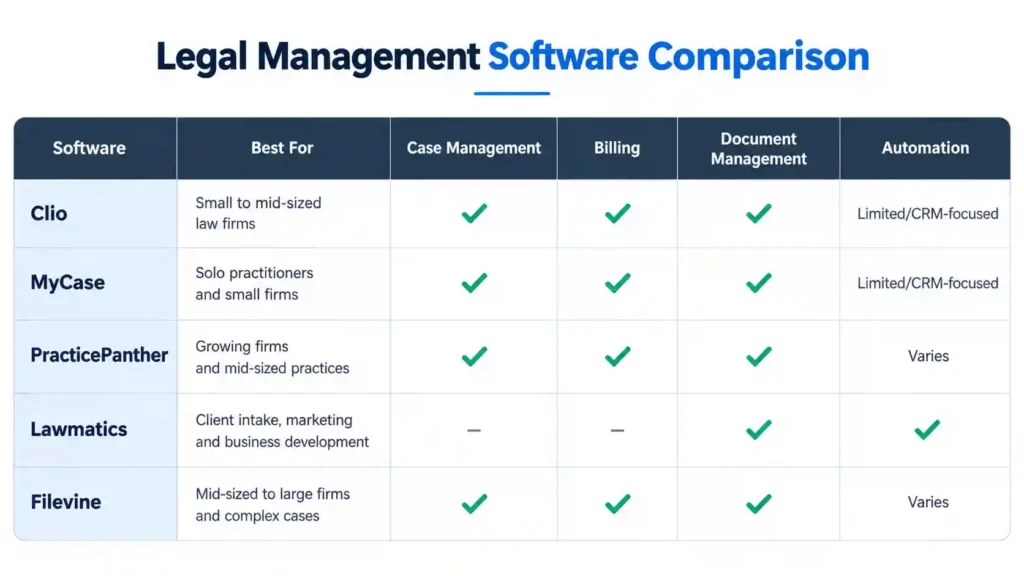
Features and plans can change, so firms should verify the latest pricing and included functionality directly with each software provider before making a purchasing decision.
What Small Firms Should Prioritize
A small firm should start with the features it will use every day. Case management, document storage, calendars, billing, client communication, and secure access are usually more important than a long list of advanced features.
It is also worth considering how easily the software can grow with the firm. A platform that supports additional users, integrations, automation, and reporting can remain useful as the practice expands.
The best solution is not necessarily the platform with the most features. It is the one that fits the firm’s workflow, budget, technical comfort, and long-term needs.
How Much Does Legal Management Software Cost?
The cost of legal management software can vary significantly depending on the provider, number of users, features, and billing plan. Some platforms charge per user each month, while others offer different plans based on the features and services included.
Basic plans may cover essential functions such as case management, calendars, document storage, and time tracking. Higher-tier plans can add advanced billing, automation, reporting, integrations, client portals, and additional administrative tools.
Small law firms should compare the total cost of ownership rather than looking only at the monthly subscription price. Additional expenses may include implementation, data migration, training, payment processing, premium support, or extra users.
Before choosing a plan, check:
- Monthly or annual subscription cost
- Number of users included
- Storage limits
- Billing and payment features
- Client portal availability
- Integrations
- Automation features
- Customer support
- Data migration costs
- Contract and cancellation terms
A cheaper platform may not provide good value if the firm later needs to purchase several additional tools. On the other hand, paying for advanced features that the team rarely uses can unnecessarily increase expenses.
How to Choose the Right Software for Your Law Firm
The best software should fit the firm’s actual workflow rather than simply offering the longest feature list. Small firms should identify their current problems and then evaluate platforms based on how effectively they solve them.
Consider Your Firm’s Size and Needs
Start by identifying the firm’s daily activities. Consider how many lawyers and staff members will use the system and how many active cases the firm typically manages.
A solo practitioner may need straightforward case management, document storage, calendars, and billing. A growing team may require user permissions, workflow automation, reporting, and collaboration features.
Check Ease of Use
Powerful software is not useful if the team finds it difficult to operate. A complicated interface can create additional administrative work and reduce adoption.
Look for clear navigation, simple dashboards, accessible support resources, and a workflow that feels practical for everyday legal work.
A free trial or product demonstration can help the team understand how the platform works before committing to a subscription.
Review Integrations
Check whether the software connects with the tools your firm already uses. Useful integrations may include email, calendars, accounting systems, payment platforms, cloud storage, and communication tools.
Good integration can reduce duplicate data entry and help different parts of the firm’s workflow work together.
Evaluate Security and Data Protection
Client information can be highly confidential, so security should be evaluated before purchasing any platform.
Review the provider’s policies for encryption, authentication, backups, user permissions, access controls, data storage, and account security. Also check how the provider handles data when a firm decides to leave the platform.
Compare Scalability
The software should be able to support the firm as it grows. Consider whether you can add users, increase storage, introduce new workflows, and connect additional applications without having to migrate to another system.
Scalability can make a significant difference for a small firm that expects its caseload or team to expand.
Ask the Right Questions During a Demo
A software demonstration should focus on your firm’s real workflow rather than a generic feature presentation.
Ask the provider:
- How easy is it to migrate existing data?
- What happens to our data if we cancel?
- Which features are included in the selected plan?
- Are there additional user or storage fees?
- What integrations are available?
- How does the platform protect client information?
- What training and customer support are provided?
- How long does implementation usually take?
- Can the system scale as the firm grows?
- Are contracts month-to-month or annual?
Testing the platform with realistic tasks can help reveal whether it actually fits the firm’s needs.
Common Mistakes When Choosing Legal Management Software
Choosing software based only on popularity or the number of features can lead to unnecessary costs and poor adoption.
One common mistake is not testing the software with an actual workflow. A platform may look impressive during a demonstration but become difficult when users perform everyday tasks.
Another mistake is ignoring staff feedback. Lawyers, paralegals, assistants, and administrative staff may use different parts of the system, so their practical experience matters.
Firms should also avoid overlooking integration requirements, security policies, data migration, training, and future growth.
A careful evaluation before purchase can reduce the risk of choosing a platform that creates more work instead of simplifying it.
AI and Automation in Legal Management Software
Artificial intelligence is becoming an important part of modern legal technology. Many software platforms are adding AI-powered tools that can help lawyers and staff handle repetitive tasks more efficiently.
Depending on the provider, AI features may assist with document review, information extraction, summaries, workflow automation, client intake, and search.
How AI Can Help Small Law Firms
AI can reduce the time spent on repetitive administrative activities. For example, an AI-powered system may help summarize information, organize documents, identify relevant data, or automate routine communications.
Small firms can benefit from these capabilities when they have limited staff and need to handle growing workloads.
However, AI should support professional judgment rather than replace it. Lawyers should review AI-generated information carefully and understand how the software handles confidential client data.
Integrations That Improve Your Workflow
Integrations allow legal management platforms to connect with other applications used by a firm. This can reduce duplicate data entry and keep information moving between different parts of the workflow.
Useful integrations may include:
- Email and communication tools
- Calendar applications
- Accounting software
- Payment platforms
- Cloud storage
- Document tools
- Client intake systems
- Marketing and CRM platforms
Before choosing a platform, check whether the integrations you already depend on are supported. A system with fewer integrations may still be a better choice if it works well with your firm’s existing tools.
Implementation and Data Migration
Buying the software is only the beginning. A successful implementation requires planning, data preparation, and staff training.
Before moving information into a new system, review existing client records, documents, contacts, and case data. Remove outdated or duplicate information where appropriate.
Prepare Your Data Before Migration
Clean and organize data before transferring it. Decide which files and records need to be moved and how they should be categorized in the new system.
A clear structure can make it easier for staff to find information after the transition.
Build Workflows Before Going Live
Identify common processes such as new client intake, document creation, billing, follow-ups, and case management.
Create these workflows in the software before asking the entire team to use the platform. This gives staff a consistent process to follow.
Train Your Team
Training should focus on real tasks rather than showing every available feature.
Staff should understand how to create matters, manage documents, update client information, track time, complete tasks, and use the functions relevant to their roles.
A gradual rollout can make the transition easier for small teams.
Frequently Asked Questions
What’s the Best Legal Practice Management Software?
The best option depends on the firm’s size, budget, workflow, and required features. Platforms such as Clio, My Case, Practice Panther, Law matics, and File vine offer different combinations of case management, billing, document management, automation, and client tools.
Small firms should compare the features they actually need instead of choosing software based only on popularity.
What Is Practice Management Software?
Practice management software is a system that helps law firms organize everyday operations such as case management, client information, documents, calendars, billing, tasks, and communications.
It can bring multiple workflows into one centralized platform and reduce the need for disconnected tools.
What Are Some Examples of Management Software?
Examples of legal practice management platforms include Clio, My Case, Practice Panther, and File vine. Each platform has different features, pricing plans, integrations, and target users.
The right choice depends on the firm’s requirements and budget.
What Features Should Small Law Firms Prioritize?
Small firms should generally prioritize case management, document organization, calendars, billing, client communication, security, ease of use, and useful integrations.
Advanced automation and AI can be valuable, but they should support the firm’s actual workflow rather than add unnecessary complexity.
How Much Does Legal Management Software Cost?
Pricing varies by provider, plan, number of users, and included features. Some platforms charge a monthly fee per user, while others offer different pricing structures.
Firms should compare subscription costs with additional expenses such as implementation, migration, training, storage, and premium features.
Conclusion
Choosing the right legal management software can help a small law firm organize its daily operations, reduce repetitive administrative work, and provide a more consistent experience for clients.
The best solution is not necessarily the platform with the largest number of features. Small firms should focus on software that fits their actual workflow and provides the tools they use most, such as case management, document organization, billing, calendars, client intake, reporting, security, and automation.
When comparing consider more than the monthly subscription price. Ease of use, data security, integrations, customer support, scalability, and migration options can have a major impact on the software’s long-term value.