SEO Auditing Service for Small Businesses provides a detailed review of a website to find issues that may affect its search visibility, rankings, organic traffic, and user experience. Instead of checking only keywords or rankings, a complete audit looks at multiple parts of a website to understand what is working and what needs improvement.
For small businesses, an SEO Auditing Service for Small Businesses can uncover problems that are often easy to miss. These may include slow-loading pages, broken links, poor mobile usability, missing metadata, weak internal linking, indexing problems, or content that does not properly match what users are searching for.
What Does an SEO Audit Check?
A complete website audit can cover several areas of SEO. The exact checks depend on the website’s size, industry, technical setup, and business goals.
Technical SEO
A technical SEO review examines how easily search engines can access, crawl, understand, and index a website. Even if a website has high-quality content, technical problems can make important pages difficult for search engines to discover or process.
The audit may include checking the XML sitemap, robots.txt file, redirects, broken pages, duplicate URLs, canonical tags, HTTPS, crawlability, and indexing settings. It can also identify server errors, incorrect status codes, and other technical issues that may affect important pages.
The goal is to make sure search engines can efficiently access the website and understand which pages should appear in search results.
On-Page SEO
On-page SEO checks focus on the elements that help search engines understand individual pages and help visitors quickly determine what each page is about. These elements should work together to create a clear and useful page experience.
An audit can review title tags, meta descriptions, headings, URLs, image alt text, keyword usage, content structure, and internal links. It may also identify pages with missing or duplicated metadata, unclear headings, poorly optimized URLs, or content that does not clearly address the target topic.
Improving these elements can make important pages more understandable and better aligned with their intended search queries.
Content and Search Intent
An SEO Auditing Service for Small Businesses also evaluates whether the website provides useful, relevant, and well-organized content for its target audience. Simply including keywords is not enough; each page should provide information that matches what users are actually looking for.
The review can identify thin, outdated, duplicated, incomplete, or poorly structured content. It can also reveal topics that are missing from the website or pages that target similar search intent and may need to be combined or improved.
Understanding search intent helps SEO Auditing Service for Small Businesses create content that answers users’ questions, supports their needs, and provides a clear reason to continue exploring the website.
Website Performance
Website performance is another important part of an SEO Auditing Service for Small Businesses review because visitors expect pages to load and respond smoothly, especially on mobile devices. Slow-loading pages can make it harder for users to find information and complete important actions.
The audit can identify large or unoptimized images, slow-loading resources, excessive scripts, poor Core Web Vitals, layout shifts, and other performance issues. Mobile usability can also be reviewed to determine whether buttons, text, navigation, and page layouts work properly on smaller screens.
Performance improvements should focus not only on technical scores but also on creating a faster, smoother, and more usable experience for visitors.
Internal Links and Backlinks
Internal linking helps visitors move between related pages while also helping search engines discover important content and understand the relationship between different pages on a website.
An audit can check whether important service pages, product pages, and articles receive relevant internal links. It may also identify orphan pages, unnecessary links, or opportunities to connect related content more naturally.
A backlink review looks at external websites that link to the business website. It can examine the number and relevance of referring domains, the pages receiving backlinks, and the overall quality of the backlink profile. This provides useful information about the website’s external authority and potential link-building opportunities.
Local SEO
For businesses that serve customers in a specific city, region, or service area, local SEO can be an important part of the audit. The review examines whether the website clearly communicates where the business operates and whether its local information is consistent and useful.
A local SEO review can include location pages, SEO Auditing Service for Small Businesses name and contact information, local keywords, customer reviews, local links, and other relevant visibility signals. It can also check whether important service and location pages provide unique information instead of repeating the same content.
For small businesses that depend on local customers, these checks can help identify gaps that may limit visibility for location-based searches and make it easier for potential customers to find relevant services.
Why Small Businesses Need an SEO Auditing Service

Small businesses often have limited time and resources, so knowing which SEO problems deserve attention first can make optimization more manageable. An audit provides a clearer picture of the website instead of relying on individual SEO metrics.
For example, a business may have good content but poor indexing, or strong rankings but slow pages and weak conversion paths. Looking at these areas together helps create a more practical SEO improvement plan.
A SEO Auditing Service for Small Businesses can also combine automated tools with manual analysis. Tools can quickly identify technical issues and performance problems, while human review can provide context about content quality, search intent, competitors, and business goals.
When Should a Small Business Get an SEO Audit?
There is no single situation in which an audit is required. However, it can be especially useful when:
- A new website has recently launched
- The website has been redesigned or migrated
- Organic traffic or rankings have declined
- Important pages are not appearing in search results
- The business is adding new services or products
- Website performance has become slower
- Competitors are gaining more organic visibility
- The business wants a clearer SEO growth plan
The most useful outcome of an audit is not simply a long list of errors. It is a prioritized understanding of what is wrong, why it matters, and what should be improved first.
SEO Auditing Service Checklist: What to Check
A thorough SEO auditing service for small business websites should examine the technical foundation, content, keywords, links, performance, and user experience. The goal is to find issues that may prevent search engines from properly understanding or ranking important pages.
1. Check Crawling and Indexing
Start by checking whether search engines can access and index the website’s important pages. Review the robots.txt file, XML sitemap, canonical tags, and indexing status in Google Search Console.
Make sure important pages are not accidentally blocked or marked with a noindex directive. At the same time, low-value or duplicate pages can be reviewed to determine whether they should remain indexed.
2. Review Website Structure and URLs
A clear website structure helps both visitors and search engines navigate the site. Important service, product, and informational pages should be easy to reach through the main navigation and internal links.
URLs should also be descriptive and easy to understand. Avoid unnecessary parameters, confusing structures, or URLs that do not clearly indicate what the page is about.
3. Evaluate Title Tags and Meta Descriptions
Every important page should have a relevant title tag and a useful meta description. These elements should accurately describe the page rather than simply repeating keywords.
For example, a small business service page should communicate the service clearly and give searchers a reason to visit the page from search results.
4. Analyze Content and Keyword Targeting
Review whether each important page targets a clear topic and satisfies the search intent behind its main keyword. Look for pages with thin content, overlapping topics, outdated information, or excessive keyword repetition.
The focus should be on creating useful content for readers first while using relevant keywords naturally throughout the page.
5. Check Internal Linking
Internal links connect related pages and help visitors discover more useful information. They can also help search engines understand the relationship between different pages on a website.
Check whether important pages receive relevant internal links and whether anchor text clearly describes the destination page.
6. Review Website Speed and Mobile Experience
A website should load efficiently across desktop and mobile devices. Check page speed, Core Web Vitals, image sizes, unnecessary scripts, and other elements that may slow down important pages.
Mobile usability should also be reviewed because visitors may access a small business website primarily through smartphones.
7. Audit Backlinks and External Links
Backlinks can provide useful signals about a website’s authority and relevance. Review the websites linking to the business, their relevance, and the overall backlink profile.
External links should also point to trustworthy and relevant sources when they add value for the reader.
8. Look for Broken Pages and Technical Errors
Broken links, 404 pages, redirect problems, duplicate URLs, and other technical errors can create problems for users and search engines.
Fixing important technical issues can improve website accessibility and make the overall site structure easier to manage.
9. Review Local SEO Signals
For businesses that serve specific locations, check whether important local information is consistent and easy to find. Review location pages, business details, local keywords, reviews, and relevant local optimization elements.
A local SEO audit tool can help identify some issues, but manual review is still useful for understanding how well the website serves local searchers.
10. Compare the Website With Competitors
Finally, compare important pages with relevant competitors. Look at the topics they cover, keywords they target, content depth, page structure, internal links, and other visible SEO elements.
The purpose is not to copy competitors. Instead, competitor analysis can reveal topics or search opportunities that your website has not addressed yet.
Types of SEO Auditing Services
Not every website has the same SEO requirements. A local service business may need different checks from an online store, while a large website may require a more detailed technical review. Understanding the main types of audits helps small businesses focus on the areas that matter most to their website and goals.
Technical SEO Audit Service
A technical SEO audit service focuses on the technical elements that affect how search engines crawl, render, and index a website.
It can include checks for:
- Crawlability and indexability
- XML sitemap and robots.txt
- Canonical tags
- Redirects and status codes
- Broken pages and links
- Duplicate URLs
- HTTPS and website security
- Site architecture
- Mobile usability
- Page speed and Core Web Vitals
Technical problems do not always appear to visitors, so regular checks can help identify issues before they affect important pages.
On-Page SEO Audit
An on-page audit examines the content and HTML elements of individual pages. It checks whether pages clearly communicate their topic to both search engines and visitors.
Common areas include title tags, meta descriptions, headings, URLs, image optimization, keyword targeting, content quality, and internal links.
For small businesses, this review can also reveal whether important service pages are targeting relevant searches or competing with each other for similar keywords.
Content SEO Audit
A content audit looks beyond individual keywords and evaluates the overall quality and usefulness of the website’s content.
It can identify:
- Outdated articles
- Thin or incomplete pages
- Duplicate content
- Pages targeting similar search intent
- Missing topics
- Weak content organization
- Opportunities to update existing pages
The goal is to make the website more useful to its target audience while improving its ability to address relevant searches.
Local SEO Audit
A local SEO audit is useful for businesses that serve customers in a specific city, region, or service area.
The review may cover local landing pages, business information, location-based keywords, reviews, local links, and other signals that help a business appear in relevant local searches.
For SEO Auditing Service for Small Businesses with multiple locations, each important location page should also provide unique and useful information rather than simply repeating the same content.
Ecommerce SEO Audit Services
Ecommerce SEO audit services are designed for online stores where product pages, categories, filters, and large numbers of URLs can create additional SEO challenges.
An ecommerce audit may examine:
- Product and category page optimization
- Product titles and descriptions
- Duplicate or thin product content
- Product and category URLs
- Internal linking
- Faceted navigation
- Image optimization
- Structured data
- Indexing of product pages
- Mobile shopping experience
The aim is to make important products and categories easier for search engines to discover while providing a better experience for potential customers.
SEO Audit for Service Businesses
An SEO audit for service business focuses on websites that generate leads rather than direct online purchases.
For example, a plumber, marketing agency, law firm, consultant, or web development company may need to evaluate its service pages, location targeting, contact paths, calls to action, and supporting content.
The audit should determine whether visitors can quickly understand:
- What service the business provides
- Who the service is for
- Where the business operates
- Why customers should consider the business
- How to contact or request the service
Competitor SEO Audit
A competitor audit examines how similar businesses approach organic search. It can reveal keyword gaps, content topics, backlink opportunities, and differences in page structure.
The objective is to understand the competitive landscape and find opportunities for your own website—not to duplicate another business’s content.
White Label SEO Audit Services
SEO audit white label services allow an agency or marketing provider to offer SEO audit work under its own brand while another specialist handles some or all of the fulfillment.
This model can be useful for agencies that want to expand their SEO services without building a large in-house audit team. However, the scope, reporting process, quality standards, and client communication should be clearly defined before using a white-label provider.
SEO Auditing Service Tools for Small Business Websites

The right tools can make an SEO audit faster and more accurate. However, no single tool can identify every problem on a website. A complete audit usually combines technical crawlers, search performance data, keyword research, backlink analysis, and manual checks.
Google Search Console
Google Search Console is one of the most useful free tools for understanding how a website performs in Google Search.
It can help you review:
- Indexed and non-indexed pages
- Search queries and impressions
- Clicks and average positions
- Sitemap status
- Page indexing issues
- Mobile usability signals
- Core Web Vitals
- Security and manual action reports
For a small business, Search Console can reveal problems that may not be visible from a normal website visit.
Google Analytics
Google Analytics provides information about how visitors interact with a website after arriving on it.
During an audit, you can use analytics data to examine traffic sources, landing pages, engagement, conversions, and other user behavior signals.
This information is especially useful when an SEO audit is connected to business goals. A page may receive organic traffic but still need improvement if visitors are not taking the desired action.
Semrush
Semrush provides several features that can support an SEO audit, including site crawling, keyword research, backlink analysis, competitor research, and position tracking.
Its Site Audit tool can help identify technical issues such as broken links, crawlability problems, duplicate content, missing metadata, and other website errors.
Semrush can also help compare keyword visibility with competitors and identify areas where a website may have opportunities to improve.
Ahrefs
Ahrefs is widely used for backlink analysis, keyword research, competitor research, and content analysis.
For an audit, it can help examine a website’s referring domains, backlinks, organic keywords, top-performing pages, and competing websites.
This makes it particularly useful when you want to understand the authority and link profile of a website rather than focusing only on technical issues.
Screaming Frog SEO Spider
Screaming Frog SEO Spider is a website crawler that can analyze many technical and on-page elements.
It can help find:
- Broken links
- Redirects
- Missing titles
- Duplicate titles
- Missing meta descriptions
- Heading issues
- Canonical problems
- URL structures
- Image-related issues
For larger websites, a crawler can save considerable time by checking many URLs systematically.
PageSpeed Insights
Google PageSpeed Insights can be used to evaluate website performance on mobile and desktop devices.
It provides performance measurements and recommendations related to loading, responsiveness, visual stability, and other technical factors.
Speed should not be viewed in isolation. An audit should also consider whether important pages are easy to use, readable, and functional on mobile devices.
A Local SEO Audit Tool
A local SEO audit tool can help businesses examine location-related SEO signals, such as business information, local listings, reviews, and visibility for location-based searches.
These tools can be helpful for businesses that depend on customers from a particular city or service area. However, automated results should be reviewed manually because a tool may not understand every aspect of a local business’s market.
How to Choose the Right SEO Audit Tools
Small businesses do not necessarily need every SEO platform available. The best combination depends on the website size, business model, budget, and audit goals.
A basic setup might include Google Search Console for search performance, Google Analytics for visitor behavior, a crawler for technical checks, and a keyword or backlink platform for deeper research.
The important point is to use tools to collect evidence and identify problems, then manually review the findings before deciding what should be fixed first.
How to Choose a Professional SEO Auditing Service
Choosing an SEO provider is not only about finding someone who can generate an audit report. A useful audit should identify real problems, explain why they matter, and provide practical recommendations that a business can actually implement.
Look for a Clear Audit Process
Before hiring an SEO provider, ask what the audit will cover. A professional review should normally consider technical SEO, on-page elements, content, keywords, internal linking, backlinks, website performance, and other areas relevant to the SEO Auditing Service for Small Businesses.
Avoid choosing a service based only on a long checklist. The quality of the analysis and recommendations is more important than the number of issues listed in a report.
Check Whether the Audit Matches Your Business
SEO requirements can vary significantly between websites.
For example, an ecommerce store may need detailed product and category analysis, while a local service business may need stronger location and service-page optimization.
A good provider should understand your business model, target audience, competitors, and main conversion goals before making recommendations.
Ask About Competitor Analysis
Competitor research can add useful context to an SEO audit. It can show which topics competitors cover, what keywords they target, how their pages are structured, and where they may have stronger authority.
However, the purpose should be to identify opportunities rather than copy competitors.
Consider Experience With Your Website Type
When comparing professional SEO audit services, consider whether the provider has experience with websites similar to yours.
For example, an ecommerce website may benefit from someone familiar with product indexing and category structures. A local business may need experience with location-based SEO and service pages.
Relevant experience can make the recommendations more specific to your situation.
Understand What Happens After the Audit
An audit is only the starting point. The findings need to be converted into an action plan.
Before hiring a provider, ask whether they offer implementation support, follow-up audits, progress tracking, or reporting after the recommendations have been applied.
If you are handling the fixes yourself, the final report should still provide enough detail for your developer or content team to understand what needs to be done.
Compare Scope Before Comparing Price
The cost of an SEO Auditing Service for Small Businesses can vary depending on website size, technical complexity, number of pages, industry, and the depth of analysis.
Instead of comparing prices alone, compare what each service actually includes. A low-cost audit with limited analysis may not provide the same value as a detailed review covering technical SEO, content, keywords, competitors, and implementation priorities.
The goal is to choose an audit process that provides clear evidence, useful recommendations, and a practical path toward improving the website.
How to Fix Issues Found by an SEO Auditing Service
Finding SEO problems is only one part of an audit. The next step is deciding which issues should be fixed first. For small businesses, trying to solve every issue at once can waste time and resources.
A better approach is to organize the findings according to their potential impact and the effort required to fix them.
Start With Critical Technical Issues
Begin with problems that can prevent search engines from accessing or indexing important pages.
These may include:
- Important pages blocked from crawling
- Incorrect noindex directives
- Broken or incorrect canonical tags
- Major server errors
- Incorrect redirects
- Missing or inaccessible XML sitemaps
- HTTPS or security problems
If search engines cannot properly access or index an important page, improving its content may not produce the expected results until the technical problem is resolved.
Fix Broken Links and Important 404 Pages
Broken internal links can create a poor user experience and make website navigation less efficient.
During the audit, identify pages returning errors and determine whether they should be:
- Restored
- Redirected to a relevant replacement
- Removed from internal links
- Returned as a proper 404 when no replacement exists
Not every 404 needs a redirect. The correct solution depends on whether the old URL has a relevant replacement and whether users or search engines still need access to it.
Improve Important On-Page Elements
After critical technical problems, review the pages that matter most to the business.
Focus on important landing pages, service pages, product pages, and articles that already receive organic traffic or target valuable searches.
Review their:
- Title tags
- Meta descriptions
- Main headings
- Content structure
- Keyword targeting
- Internal links
- Image optimization
- Calls to action
These improvements can make important pages clearer and more useful to both searchers and search engines.
Strengthen Thin or Outdated Content
An audit may reveal pages that provide very little useful information or contain outdated details.
Instead of automatically deleting these pages, first determine whether they can be improved.
You might:
- Add missing information
- Update outdated statistics or examples
- Improve the structure
- Answer relevant user questions
- Combine overlapping pages
- Add useful internal links
The goal is to make the content more complete and relevant to its intended search.
Improve Internal Linking
Internal links help visitors discover related content and help search engines understand the relationship between pages.
Start by linking important pages from relevant high-value content. For example, a blog post about small business SEO could naturally link to a related SEO service page.
Avoid adding links simply to increase the number of internal links. Each link should provide a useful path for the reader.
Address Website Performance Problems
Website speed and mobile usability should also be considered during implementation.
If the audit identifies performance problems, possible improvements may include:
- Compressing and properly sizing images
- Removing unnecessary scripts
- Reducing unused CSS or JavaScript
- Improving caching
- Optimizing fonts
- Reviewing third-party resources
- Improving mobile page layouts
Performance improvements should be tested after implementation to confirm that the changes actually improve the user experience.
Review Backlinks Carefully
A backlink audit can reveal links pointing to the website from other domains. However, not every low-quality-looking link requires immediate action.
Review the overall backlink profile and focus on meaningful patterns rather than reacting to individual links without evidence of a problem.
The main objective is to understand the website’s authority and identify opportunities for earning relevant, trustworthy links.
Create an SEO Action Plan
Once the audit findings have been reviewed, turn them into a simple action plan.
Review the Audit Report Format
Ask what you will receive after the audit is completed. A useful report should be organized and easy to understand rather than presenting hundreds of technical warnings without context.
Look for a report that explains:
- The problem
- The affected pages
- Why the issue matters
- Recommended solution
- Priority level
- Possible business impact
Screenshots, examples, and supporting data can also make technical recommendations easier for non-SEO professionals to understand.
Check Whether Issues Are Prioritized
Not every SEO problem deserves immediate attention.
For example, a critical indexing problem affecting important pages may require attention before a minor metadata issue. A professional audit should help separate high-priority problems from lower-impact recommendations.
A simple priority system can include:
High priority: Issues that can prevent crawling, indexing, ranking, or conversions.
Medium priority: Issues that can improve SEO performance but are not immediately damaging.
Low priority: Minor improvements that can be addressed after more important work is completed.
Look for Practical Recommendations
An audit should not simply say that something is wrong. It should explain what needs to change.
For example, instead of reporting “duplicate title tags,” a useful recommendation could identify the affected pages and explain how each title should be made unique and relevant to its page.
This makes the audit more useful for business owners, developers, and content teams.
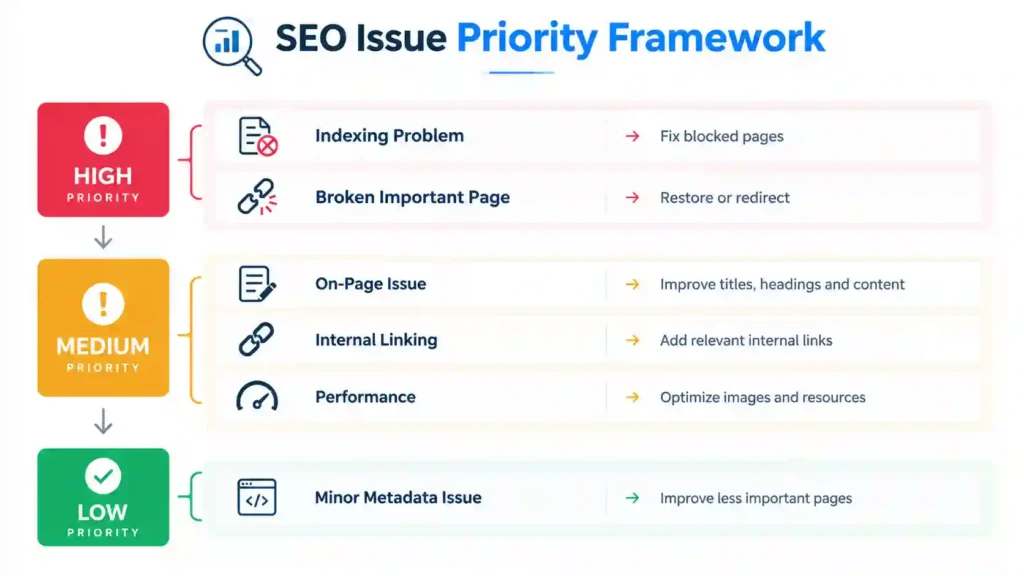
This approach prevents a small business from spending most of its time on minor issues while more important problems remain unresolved.
Monitor Results After Fixes
SEO changes should be monitored after implementation. Check whether pages are being indexed correctly, whether search impressions change, and whether important pages receive more relevant organic traffic over time.
Keep a record of the major changes made after the audit. This makes it easier to understand which improvements produced useful results and which areas may need additional work.
An SEO Auditing Service for Small Businesses should therefore be treated as an ongoing improvement process rather than a one-time technical checklist.
How Often Should You Use an SEO Auditing Service?
An SEO audit should not always be treated as a one-time task. Websites change over time as new pages are published, old content is updated, technical settings are changed, and search engines continue to evolve.
The right audit schedule depends on the size of the website, how frequently it changes, and the importance of organic search to the business.
Small Business Websites
For a small website with a limited number of pages, a detailed SEO audit once or twice a year can provide a useful health check.
Regular monitoring should still happen between full audits. Tools such as Google Search Console can help identify indexing, performance, and search visibility issues as they appear.
Websites That Publish Content Frequently
Businesses that publish new articles or landing pages regularly may need more frequent reviews.
A lighter monthly or quarterly check can help identify issues such as:
- New broken links
- Incorrect indexing settings
- Duplicate content
- Missing metadata
- Declining organic traffic
- New keyword opportunities
- Internal linking gaps
A full audit does not necessarily need to be repeated every month. Smaller checks can be used to monitor the website between comprehensive audits.
Large or Ecommerce Websites
Large websites can require more frequent technical monitoring because they may contain hundreds or thousands of URLs.
Ecommerce websites can also change frequently as products are added, removed, discontinued, or reorganized. These changes can affect indexing, internal links, category pages, and product visibility.
For these websites, regular crawling and monitoring can help identify problems before they affect a large number of pages.
After a Major Website Change
An SEO audit is especially useful after a major website update.
Consider reviewing the site after:
- A website redesign
- A domain migration
- A major URL structure change
- A CMS migration
- A large content update
- Changes to navigation
- Removal of important pages
- Significant changes to product or service categories
Technical changes can unintentionally affect crawling, indexing, redirects, and internal linking, so checking the website afterward can help identify unexpected problems.
When Organic Traffic Drops
A noticeable decline in organic traffic or search visibility can also be a reason to investigate the website.
However, a traffic decline does not automatically mean that there is a technical SEO problem. Seasonal changes, changes in search demand, content competition, algorithm updates, and tracking issues can also affect traffic.
An audit can help separate technical problems from broader changes in search performance.
A Simple SEO Audit Schedule
SEO Auditing Service for Small Businesses can use a simple schedule to keep SEO maintenance manageable:
Monthly: Monitor Search Console, important rankings, traffic, and major technical alerts.
Quarterly: Review important pages, internal links, content performance, and new technical issues.
Every 6–12 months: Conduct a broader SEO audit covering technical SEO, on-page optimization, content, keywords, backlinks, competitors, and user experience.
After major changes: Perform an additional review to make sure the website continues to work correctly.
The exact schedule should be adjusted according to the website’s size, business goals, and rate of change. Consistent monitoring is generally more useful than waiting until a major SEO problem appears.
Common SEO Audit Mistakes to Avoid
An SEO audit can provide valuable information, but the results are only useful when they are interpreted correctly. Focusing on the wrong problems or applying changes without understanding their purpose can waste time and resources.
Focusing Only on Technical SEO
Technical SEO is an important part of an audit, but it is not the entire process.
A website can have a technically healthy structure and still struggle because its content does not match search intent, its pages target the wrong keywords, or its website does not provide a clear path for visitors.
A complete audit should consider technical SEO alongside content, on-page optimization, links, user experience, and business goals.
Treating Every Tool Warning as a Critical Problem
SEO tools can generate a large number of warnings and recommendations. Not every warning requires immediate action.
For example, a minor metadata issue on a low-priority page may be less important than an indexing problem affecting an important service page.
Always review the context and potential impact before deciding what to fix.
Using SEO Audit Keywords Without Considering Search Intent

Adding a keyword to a page does not automatically make the page relevant for that search.
The content should match what users are actually looking for. If someone searches for an informational topic, a page focused only on selling a service may not satisfy the same intent.
Keyword research should therefore be combined with search intent and content analysis.
Creating Duplicate or Similar Pages
Some businesses create separate pages for very similar keywords without providing enough unique value.
This can make the website difficult to organize and may cause multiple pages to compete for similar searches.
Before creating a new page, check whether an existing page already addresses the same topic or search intent.
Ignoring Internal Links
Businesses sometimes focus heavily on backlinks while overlooking links between their own pages.
A well-organized internal linking structure can help users discover related information and make important pages easier for search engines to understand.
Review whether your most valuable pages are connected naturally from relevant content.
Making Too Many Changes at Once
Applying dozens of SEO changes simultaneously can make it difficult to understand which changes had an effect.
Where possible, organize improvements into stages and keep a record of significant changes. This creates a clearer connection between implementation and later performance data.
Ignoring the User Experience
SEO should not be treated as something separate from the website experience.
A page may attract visitors from search engines but still perform poorly if it is difficult to navigate, slow on mobile devices, confusing, or missing a clear next step.
Review important pages from the perspective of a real visitor, not only from an SEO tool’s perspective.
Forgetting to Monitor Changes
Completing an audit does not mean the SEO work is finished.
After important fixes are implemented, monitor search visibility, indexing, traffic, conversions, and other relevant metrics.
This helps determine whether the changes solved the original problems and whether additional improvements are needed.
Expecting Immediate Results
SEO changes do not always produce immediate improvements. Search engines may need time to recrawl and reassess updated pages, while competitive and content changes can take longer to show measurable effects.
Instead of judging an audit immediately after implementation, track meaningful changes over an appropriate period and compare them with the original baseline.
A successful audit is therefore not simply a report full of technical findings. Its value comes from identifying meaningful problems, prioritizing them correctly, implementing practical solutions, and monitoring the results over time.
FAQs About SEO Auditing Services
What Are the Top 5 SEO Audit Tools?
Five commonly used tools for different parts of an SEO audit are Google Search Console, Semrush, Ahrefs, Screaming Frog SEO Spider, and Google PageSpeed Insights.
Each tool serves a different purpose. Search Console provides Google Search performance and indexing data, while Semrush and Ahrefs offer broader SEO research and analysis. Screaming Frog is useful for crawling websites, and PageSpeed Insights focuses on website performance.
Using more than one tool can provide a more complete view of a website.
How Much Does an SEO Auditing Service for Small Businesses Cost?
The cost of an SEO audit varies depending on factors such as website size, number of pages, technical complexity, industry, and the depth of analysis required.
A basic audit may focus on major technical and on-page problems, while a comprehensive audit can include technical SEO, content, keywords, competitors, backlinks, local SEO, performance, and user experience.
Instead of comparing price alone, businesses should compare the scope of work and the level of detail included in the audit.
Can ChatGPT Do an SEO Audit?
ChatGPT can assist with several parts of an SEO Auditing Service for Small Businesses, such as reviewing content, suggesting title tags and headings, analyzing keyword ideas, creating checklists, and helping interpret SEO data provided by the user.
However, a complete website audit usually requires access to crawling data, Search Console information, analytics, backlink data, and other technical information.
For this reason, ChatGPT can be used as an SEO analysis assistant, but it should not automatically be treated as a replacement for website crawling and data collection tools.
Which Tool Is Best for SEO Audit?
There is no single tool that covers every part of an SEO audit equally well.
The right choice depends on what you need to analyze. For example, Google Search Console is useful for Google’s search and indexing data, Screaming Frog can help with detailed website crawling, while Semrush and Ahrefs provide broader SEO research features.
For a small business website, combining a few tools with manual review can provide a more complete audit than relying on one platform alone.
Is an SEO Audit Necessary for a Small Business?
An SEO audit can help a SEO Auditing Service for Small Businesses understand technical problems, content gaps, indexing issues, keyword opportunities, and areas where the website experience can be improved.
It is particularly useful when a website has experienced a traffic decline, has recently been redesigned, is not generating enough organic leads, or has not been reviewed for a long period.
How Often Should a Small Business Perform an SEO Audit?
A small business can consider a broader audit every 6–12 months, while performing lighter checks more frequently.
Additional reviews may also be useful after a website redesign, domain migration, major URL changes, or significant content updates.
The ideal schedule depends on how frequently the website changes and how important organic search is to the business.
Final Thoughts
An SEO audit gives small businesses a clearer view of how their website is performing in search and where improvements may be needed. It can uncover technical problems, content gaps, weak internal linking, indexing issues, performance concerns, and opportunities that may otherwise be overlooked.
The most useful approach is to treat an audit as a starting point rather than simply a report. Once the problems are identified, they should be prioritized according to their potential impact and the effort required to fix them.
For small businesses, the process can begin with the most important technical and indexing issues, followed by improvements to key pages, content, internal links, website performance, and other relevant SEO areas.
Whether you perform the review yourself or use SEO Auditing Service for Small Businesses, the goal should remain the same: understand the website, identify meaningful opportunities, implement practical improvements, and monitor the results over time.