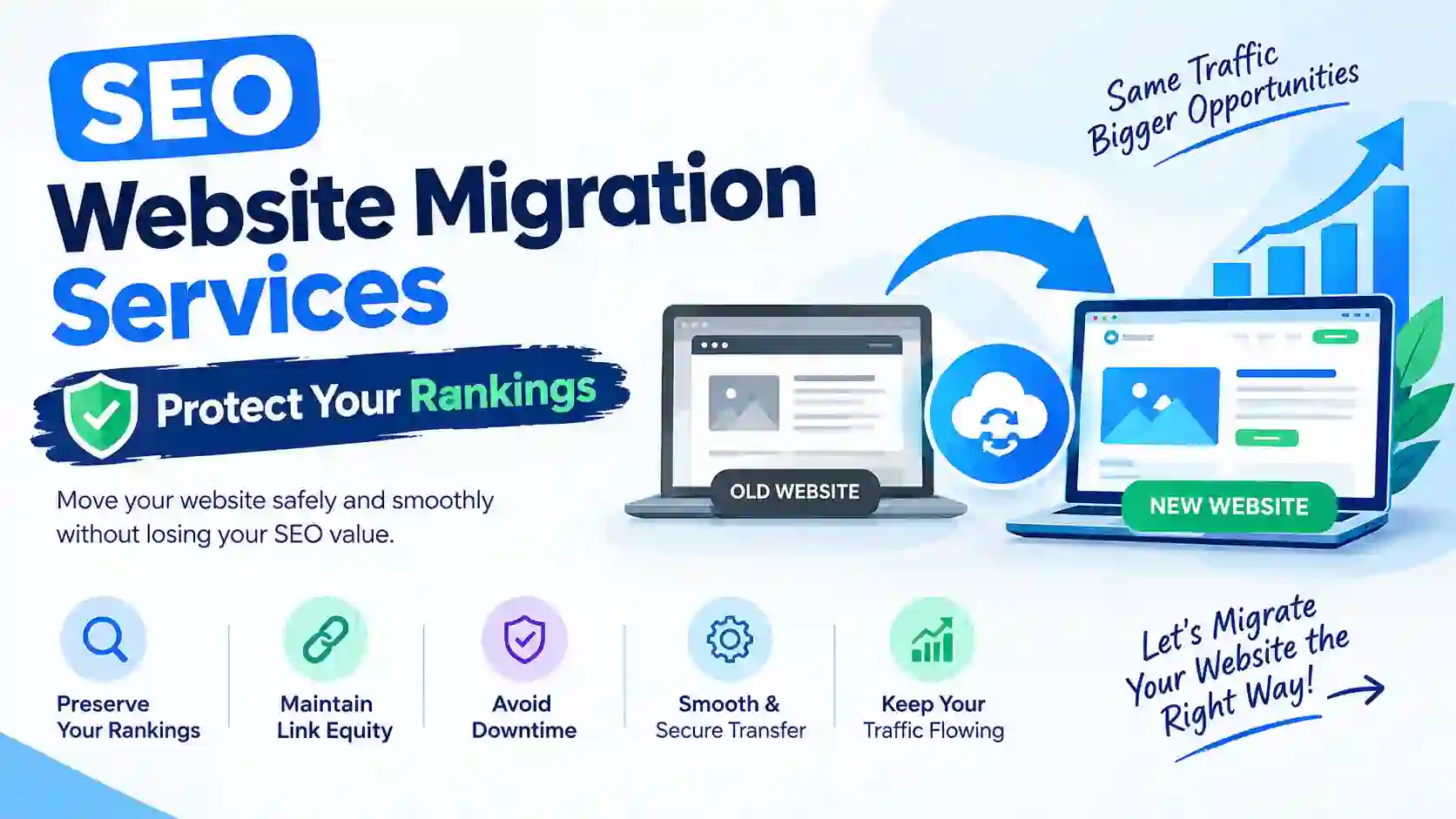
SEO Website Migration Services can create exciting opportunities for businesses, but it also brings SEO risks. A poorly planned move can affect search rankings, organic traffic, and revenue. A professional SEO Migration Service helps businesses move their websites while protecting existing search visibility and maintaining a smooth user experience.
Whether you are changing your domain, redesigning your website, switching CMS platforms, or moving to a new hosting provider, SEO should remain a priority throughout the process. Proper planning, URL mapping, technical checks, and redirect management can prevent many common migration problems.
1. What Is an SEO Migration Service?
An SEO migration service helps businesses maintain their search engine visibility when they make significant changes to their websites. These changes may involve a new domain, website redesign, content management system (CMS), URL structure, or hosting environment.
The main goal is to preserve existing SEO website migration services value while helping search engines understand the updated website.
A professional SEO migration process usually includes:
- Website SEO audit: Reviewing existing rankings, traffic, backlinks, and indexed pages.
- URL mapping: Matching old website URLs with their relevant new destinations.
- 301 redirects: Sending visitors and search engines from outdated URLs to appropriate new pages.
- Technical SEO checks: Reviewing canonical tags, robots.txt, XML sitemaps, and crawlability.
- Performance monitoring: Tracking organic traffic, rankings, indexing, and technical errors after launch.
How SEO Website Migration Services Work
SEO website migration services follow a structured process that covers preparation, implementation, and post-launch monitoring.
First, SEO specialists examine the existing website to identify valuable pages and technical issues. Next, they prepare a migration plan that includes URL mapping, redirects, content preservation, and testing.
After launch, they check whether search engines can access the new website correctly. They also monitor organic traffic and rankings to identify problems early.
This approach helps businesses reduce unnecessary ranking losses and maintain a stronger search presence during major website changes.
2. Types of SEO Website Migrations
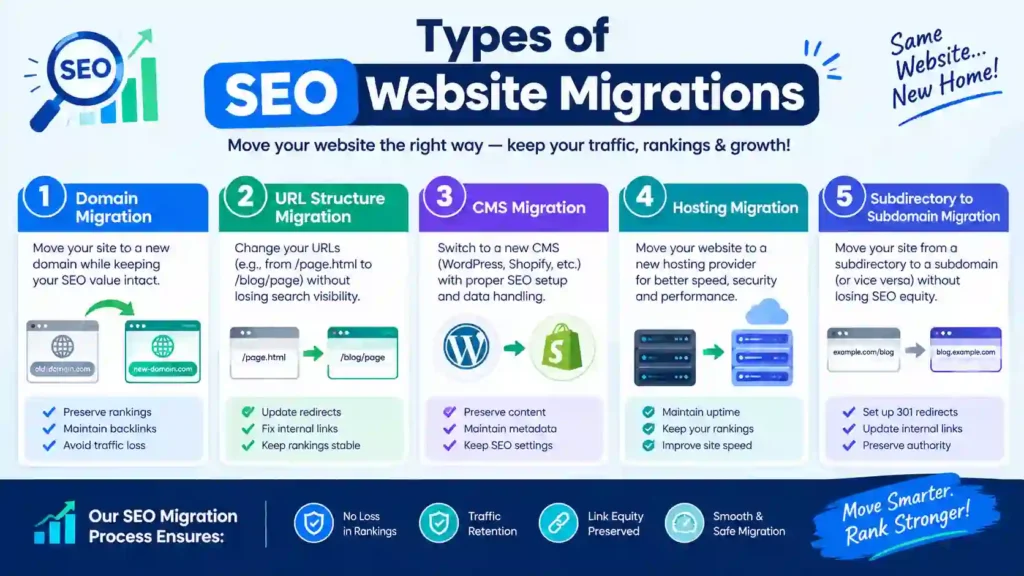
Not every website migration involves the same changes. Some migrations affect URLs, while others change the entire website structure or platform. Understanding the migration type helps businesses prepare the right SEO strategy.
- Domain Migration: Domain migration happens when a business moves its website from one domain name to another. For example, a company might change its domain during rebranding or business expansion. This process requires careful URL mapping and 301 redirects. Website owners should also update internal links, canonical tags, XML sitemaps, and relevant external profiles.
- Website Redesign Migration: A website redesign changes the appearance, layout, navigation, or structure of an existing website. Although a visual redesign may seem unrelated to SEO website migration services, changes to page URLs, headings, content, internal links, and navigation can affect organic performance. Businesses should preserve valuable content and important page elements throughout the redesign.
- CMS Migration: CMS migration involves moving a website from one content management system to another. For example, a business might switch from Wix or Squarespace to WordPress. The new platform may use different URL structures, templates, metadata settings, or content formats. SEO specialists should check these elements before launching the migrated website.
- HTTP to HTTPS Migration: An HTTP-to-HTTPS migration moves a website to a secure connection using an SSL certificate. Website owners should configure HTTPS correctly, redirect HTTP URLs to their HTTPS versions, and update canonical tags and internal links. They should also check for mixed-content errors that can affect browser security.
- Hosting Migration: Hosting migration involves transferring website files and databases to a different hosting provider or server. Although the domain may remain unchanged, incorrect server settings, downtime, slow loading speeds, or crawling restrictions can create SEO problems.
Testing the new hosting environment before switching servers helps reduce these risks.
3. Benefits of a Professional SEO Migration Service
Website migration involves several technical and SEO tasks that require careful coordination. A small mistake can affect important pages, search engine crawling, and organic traffic.
Professional SEO migration services help businesses manage these changes through a structured strategy.
Here are some important benefits:
- Protect Existing Search Rankings: Experienced SEO specialists identify pages that already perform well in search results. They create a plan to preserve important URLs, content, metadata, and internal links during migration.
- Maintain Organic Traffic: Organic traffic often comes from pages that already attract visitors through search engines. Proper redirects and content preservation help users reach relevant pages after the migration.
- Prevent Technical SEO Problems: Migration can introduce broken links, redirect chains, duplicate pages, indexing problems, and incorrect canonical tags. Technical checks help identify these issues before they cause larger problems.
- Preserve Valuable Backlinks: External websites may link to important pages on your domain. If those URLs change without appropriate redirects, visitors and search engines may encounter broken destinations.
- Improve Website Performance: A migration also provides an opportunity to improve website speed, mobile usability, navigation, and technical structure. These improvements can support a better user experience and stronger long-term SEO performance.
4. How Website Migration Impacts SEO
Website migration can influence several aspects of search engine optimization. The impact depends on the type of migration, the quality of preparation, and how accurately the technical changes are implemented.
Common SEO website migration services effects include:
- Ranking fluctuations: Search positions may change while search engines process updated URLs and website content.
- Organic traffic changes: Visitors may decline if important pages lose visibility or redirect incorrectly.
- Indexing issues: Search engines may struggle to discover new pages when sitemaps, robots.txt, or internal links contain errors.
- Backlink disruptions: External links may lead to outdated pages if website owners do not configure redirects.
- Crawling problems: Incorrect server settings or blocked resources can prevent search engines from accessing important content.
However, website migration does not automatically cause permanent ranking losses. Careful planning, accurate redirects, and consistent monitoring can help businesses manage these risks.
The most important step is to identify valuable pages before migration and verify their performance after launch.
5. SEO Migration Service Checklist
A website migration SEO checklist helps businesses organize important tasks before, during, and after a website move. It reduces the chances of missing critical SEO elements and makes the migration process easier to manage.
Before starting the migration, review these essential tasks:
Pre-Migration Checklist
Preparation helps identify valuable website elements that need protection.
- Crawl the existing website and export all important URLs.
- Review Google Search Console performance data.
- Record current keyword rankings and organic traffic.
- Identify high-performing pages and valuable backlinks.
- Check existing title tags, meta descriptions, and headings.
- Create a complete URL mapping spreadsheet.
- Review internal links and website navigation.
- Back up website files and databases.
Launch-Day SEO Checklist
Launch day requires careful technical checks to ensure the new website works correctly.
- Test all important 301 redirects.
- Confirm that the new website uses HTTPS.
- Remove staging website restrictions.
- Check canonical tags on important pages.
- Verify robots.txt settings.
- Publish and submit the updated XML sitemap.
- Test internal links and navigation.
- Check Google Analytics 4 tracking.
- Confirm that important pages return the correct HTTP status codes.
Post-Migration SEO Checklist
After launch, continue checking the website to identify problems that may affect search visibility.
- Monitor organic traffic and keyword rankings.
- Check indexing reports in Google Search Console.
- Identify broken links and redirect errors.
- Review crawl statistics and server responses.
- Check mobile usability and page speed.
- Monitor conversions and important landing pages.
- Fix technical issues as soon as possible.
Following this checklist helps businesses maintain better control over their website migration and SEO performance.
6. Preparing for an SEO-Friendly Website Migration
A successful migration starts with a clear plan. Businesses should understand which website elements will change, which pages need protection, and who will handle each technical task.
- Set Clear Migration Goals: Start by identifying the main reason for the migration. Your goal might involve improving website performance, changing your domain, updating the design, or moving to a more flexible CMS.
- Audit Your Existing Website: Review the current website before making changes. Examine organic traffic, keyword rankings, indexed pages, backlinks, and technical SEO website migration services performance.
- Create a URL Mapping Document: Prepare a spreadsheet containing existing URLs and their corresponding new destinations. Every valuable old page should have a relevant destination whenever its URL changes.
- Test the Staging Website: A staging website allows your team to test the new design and technical setup before the public launch. Check navigation, page content, metadata, redirects, canonical tags, mobile usability, and loading speed. Also confirm that search engines cannot accidentally index private staging pages.
- Assign Responsibilities: Website migration often involves developers, SEO specialists, content writers, and project managers. Assigning responsibilities helps prevent confusion and ensures that important tasks receive attention before launch.
7. How to Migrate a Blog Website Without Losing SEO
Blog migrations require special attention because websites often contain hundreds of articles, category pages, internal links, and backlinks. Losing important URLs or content can affect organic traffic and search rankings.
If you want to understand how to migrate blog websites SEO safely, follow these practical steps.
- Back Up Your Existing Blog: Create a complete backup of your blog, including its database, images, themes, plugins, and content files. A reliable backup gives you a recovery option if something goes wrong during migration.
- Export Blog Posts and Pages: Prepare a complete inventory of published articles, pages, categories, and tags. Record their existing URLs and identify posts that already receive organic traffic. Do not overlook older articles that attract valuable visitors or backlinks.
Preserve Important Content and Metadata
Keep essential content elements consistent whenever possible, including:
- SEO titles and meta descriptions.
- H1, H2, and H3 headings.
- Image alt text.
- Internal links.
- Canonical URLs.
- Structured data where applicable.
If you update the content or structure, make sure the new version still satisfies the original search intent.
Set Up Relevant URL Redirects
If your new blogging platform changes existing URLs, create appropriate 301
8. URL Mapping and Redirects for SEO Migration for Website Migration
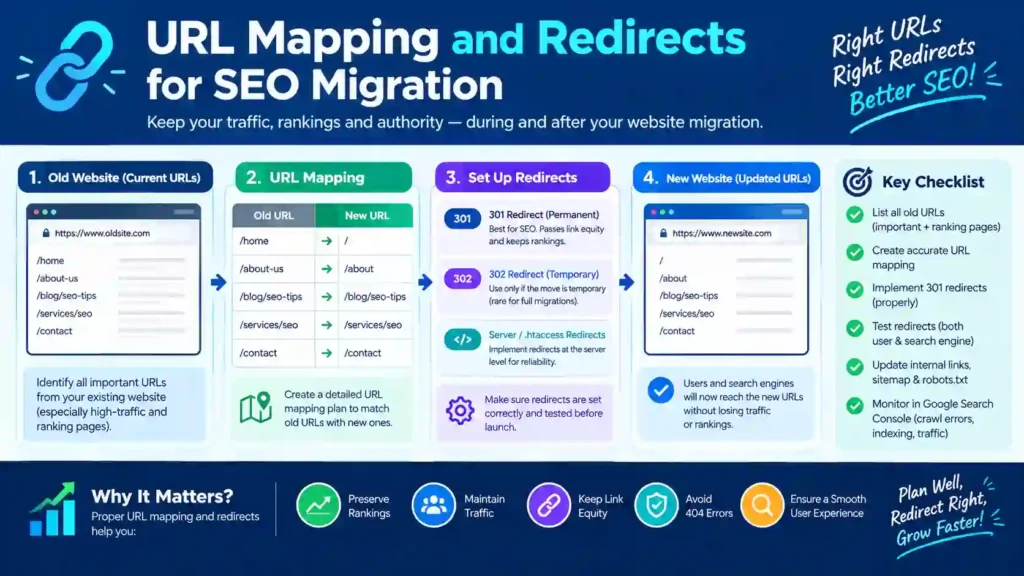
URL mapping plays an important role in protecting organic traffic during website migration. When a website changes its domain, structure, or CMS platform, some existing URLs may also change.
Without a proper redirect strategy, visitors may encounter broken pages, and search engines may struggle to find the updated content.
Create a Complete URL Mapping Spreadsheet
Start by exporting all existing website URLs. Use a website crawler to identify important pages, blog posts, category pages, and other indexed resources.
Create a spreadsheet with these columns:
- Old URL
- New URL
- Page title
- Organic traffic
- Backlink information
- Redirect status
Match every valuable old URL with its most relevant new destination. Avoid redirecting unrelated pages to the homepage because this can create a poor user experience.
How to Set Up 301 Redirects When Migrating a Website
301 redirects tell browsers and search engines that a page has permanently moved to another URL.
For example:
Old URL: https://example.com/seo-guide/
New URL: https://example.com/digital-marketing/seo-guide/
A 301 redirect sends visitors from the old address to the new destination.
For redirects during SEO website migration, follow these practices:
- Redirect old pages to relevant new pages.
- Avoid redirect chains and unnecessary redirect loops.
- Update internal links to point directly to new URLs.
- Test redirects before and after launch.
- Keep important redirects active for the long term.
You can configure redirects through server settings, such as Apache or Nginx, or use a suitable WordPress redirection plugin.
9. Technical SEO Checks Before Website Launch
Technical SEO checks help identify problems that could prevent search engines from accessing, understanding, or indexing the new website.
Before launching, review the following elements carefully.
- Check Canonical Tags: Canonical tags identify the preferred version of a webpage when similar or duplicate URLs exist. Make sure important pages contain accurate canonical URLs that point to their intended destinations. Incorrect canonical tags can confuse search engines about which version they should index.
- Review Robots.txt and Indexing Settings: Check the robots.txt file to confirm that it does not block important website sections. Also review page-level robots directives and HTTP headers. Remove any accidental noindex restrictions from pages that should appear in search results.
- Update the XML Sitemap: Create an updated XML sitemap containing the new canonical URLs that you want search engines to discover. Remove outdated URLs and submit the new sitemap through Google Search Console.
- Test Structured Data: If your website uses structured data, check whether the new website retains the correct schema markup. Validate important elements such as articles, breadcrumbs, products, and organization information. Fix errors that could affect eligibility for relevant search features.
- Check Website Speed and Mobile Performance: Test important pages on desktop and mobile devices. Review loading performance, navigation, image optimization, and Core Web Vitals.
10. Launch-Day SEO Migration Checklist
The launch day requires coordination between developers and SEO specialists. Both teams should follow a shared checklist to verify that the new website works as expected.
- Activate and Test Redirects: Enable all planned 301 redirects and test important old URLs. Confirm that each one leads to the correct new page. Check for redirect loops, broken destinations, and unnecessary multiple redirects.
- Remove Staging Website Restrictions: Development websites often use password protection or noindex directives to prevent search engine indexing. Before launch, remove restrictions that could block search engines from accessing the public website. Keep private development environments protected.
- Verify Tracking and Analytics: Confirm that Google Analytics 4 tracks website visits and important events correctly. Also verify Google Search Console ownership and inspect important pages to check their availability to Google.
- Check Important Pages and HTTP Status Codes: Test your homepage, service pages, blog posts, and category pages. Important live pages should generally return a 200 status code. Redirected pages should return the intended redirect response, while removed pages should not lead to unnecessary errors.
- Submit the Updated XML Sitemap: After confirming that the new website works correctly, submit its updated XML sitemap through Google Search Console. This helps Google discover the new URLs and process the website changes.
11. SEO Monitoring After Website Migration and Optimization
SEO work does not end when the new website goes live. Search engines need time to crawl updated URLs, process redirects, and understand changes to the website.
Consistent monitoring helps identify technical issues before they affect a larger number of pages.
Monitor Organic Traffic and Rankings
Use Google Search Console and Google Analytics 4 to compare post-migration performance with your previous records.
Pay attention to:
- Organic clicks and impressions.
- Average keyword positions.
- Important landing page traffic.
- Search visibility.
- Leads, sales, and conversions.
A temporary ranking fluctuation does not always indicate a serious problem. However, a sudden or continuing decline deserves investigation.
Check Indexing and Crawl Errors
Review Google Search Console’s indexing reports to identify pages that Google cannot index.
Inspect important URLs and look for blocked pages, incorrect canonical tags, server errors, and redirect problems.
Find and Fix Broken Links
Crawl the new website to identify broken internal links, outdated URLs, redirect chains, and missing pages.
Update internal links to point directly to the correct destinations. Also review valuable external backlinks and contact linking websites when important links need updating.
Review Website Performance Regularly
Continue monitoring website speed, mobile usability, organic traffic, and conversions.
Compare performance against your pre-migration baseline and document any significant changes. This information helps your SEO team identify problems and prioritize improvements.
12. How to Recover Lost Rankings After Website Migration
A website may experience ranking fluctuations or organic traffic losses after migration. These changes can happen when search engines discover new URLs, process redirects, or encounter technical problems.
The first step is to identify the cause instead of making unnecessary changes.
Identify the Causes of Traffic Drops
Compare your current website performance with pre-migration data. Use Google Search Console to identify pages that have lost clicks, impressions, or search visibility.
Check for common problems such as:
- Missing or incorrect 301 redirects.
- Broken internal links.
- Incorrect canonical tags.
- Accidental noindex directives.
- Blocked pages in robots.txt.
- Missing content or metadata.
- Server errors and slow page loading.
Restore Important Pages and Links
Prioritize pages that previously attracted valuable organic traffic or backlinks.
Restore missing content, correct redirect destinations, and update internal links. If important backlinks point to outdated URLs, make sure those URLs redirect to relevant live pages.
Continue monitoring performance and avoid making several major website changes simultaneously. A structured recovery process makes it easier to identify improvements and prevent additional problems.
13. What Does a Website Migration SEO Service Include?
A website migration SEO service covers the planning, technical implementation, and monitoring required to protect a website’s search visibility during major changes.
The exact deliverables depend on the website’s size, platform, and migration requirements.
Common services include:
- Pre-Migration SEO Audit: An SEO specialist reviews existing URLs, rankings, organic traffic, backlinks, content, and technical performance to establish a baseline.
- Migration Planning and URL Mapping: The consultant prepares a migration roadmap and maps existing URLs to their appropriate new destinations.
- Technical SEO Implementation: This stage covers redirects, canonical tags, XML sitemaps, robots.txt, structured data, and other technical requirements.
- Launch Support and Testing: SEO specialists coordinate with developers to test the new website, verify important pages, and identify technical problems during launch.
- Post-Migration Monitoring: After launch, the team monitors indexing, rankings, organic traffic, crawl errors, and conversions. They also recommend fixes when problems appear.
14. Choosing the Right SEO Migration Consultant
Choosing the right consultant can make a significant difference to your migration project. Look for someone who understands technical SEO and can coordinate effectively with your development team.
Consider these factors before hiring a professional.
- Review Technical SEO Experience: Look for experience with website redesigns, domain changes, CMS migrations, redirects, and indexing problems.
- Ask About Previous Migration Projects: Request examples of previous migration projects and ask how the consultant handled technical challenges.
- Check Their Migration Process: A reliable consultant should explain how they handle pre-migration audits, URL mapping, staging tests, launch support, and post-migration monitoring.
- Evaluate Reporting and Communication: Choose a consultant who provides clear progress updates and performance reports. Good communication helps your development and marketing teams coordinate throughout the project.
15. How Much Does a Website Migration Service Cost?
The cost of a website migration service depends on the website’s size, technical complexity, migration type, and level of SEO support.
A small business website with a limited number of pages usually requires less work than a large e-commerce website with thousands of URLs.
Several factors influence the final price.
- Website Size and Complexity: Websites with many pages, complex navigation, multiple languages, or large product catalogs require more auditing and URL mapping.
- Type of Migration: A simple hosting change may require fewer SEO tasks than a complete domain, CMS, or website redesign migration.
- Technical SEO Requirements: Custom redirects, structured data, database changes, technical testing, and development support can increase project costs.
- Consultant or Agency Experience: Experienced SEO consultants and agencies may charge higher fees because they offer specialized knowledge and more comprehensive migration support.
16. Common Website Migration SEO Mistakes to Avoid
Even a well-planned migration can encounter problems when teams overlook important SEO details.
Avoid these common mistakes:
- Skipping the pre-migration audit: Without baseline data, identifying ranking and traffic losses becomes difficult.
- Ignoring URL mapping: Missing destination URLs can create broken pages and unnecessary redirects.
- Using irrelevant redirects: Sending unrelated pages to the homepage can confuse visitors and search engines.
- Forgetting internal links: Old internal URLs can create unnecessary redirects and poor navigation.
- Blocking search engines: Incorrect robots.txt rules or noindex directives can prevent important pages from appearing in search results.
- Ignoring mobile performance: Poor mobile usability can damage the user experience.
- Stopping monitoring too early: Migration-related problems may appear after launch, so regular checks remain important.
A detailed migration plan and consistent technical reviews can help businesses avoid these problems.
17. Frequently Asked
What Is Migration in SEO?
SEO website migration services refers to the process of managing website changes while protecting search engine visibility. It can involve domain changes, website redesigns, CMS transfers, URL restructuring, or hosting migrations. The process includes audits, redirects, technical checks, and performance monitoring.
How Much Does a Website Migration Service Cost?
SEO website migration services costs depend on the number of pages, migration type, technical requirements, and professional support. Small websites generally require less work than large e-commerce platforms. Request a customized quotation to understand the complete project cost.
How Long Does SEO for Site Migration Take?
The migration preparation may take several weeks, depending on website size and complexity. Search engines may need additional time to crawl new URLs and process changes. Ranking recovery varies according to the quality of implementation, website authority, and technical issues.
How Can I Migrate a Website Without Losing SEO Rankings?
Start with a complete SEO audit, create an accurate URL mapping document, implement relevant 301 redirects, preserve important content and metadata, and test the new website before launch. Monitor indexing and organic performance after migration.
Are 301 Redirects Important for Website Migration?
Yes. 301 redirects help send visitors and search engines from permanently moved URLs to their relevant new destinations. They also help consolidate signals associated with the old URLs. Test every important redirect to avoid errors and unnecessary chains.
Does Website Migration Affect Organic Traffic?
Yes. Website migration can temporarily affect organic traffic because search engines need to process updated URLs and technical changes. Poor redirects, missing content, and indexing problems can create larger traffic losses. Proper preparation and monitoring help reduce these risks.
Final Thoughts on SEO Migration Service
Website migration requires more than moving files and updating a website’s design. Businesses must also protect existing URLs, valuable content, backlinks, and technical SEO elements.
A reliable SEO website migration services helps organize this process through proper planning, accurate redirects, technical testing, and post-launch monitoring.
Before launching your new website, complete a detailed SEO audit and prepare a migration checklist. After launch, monitor search performance and fix technical issues quickly. These steps can help protect your organic visibility and support long-term business growth.