Business Automation Consulting for Small Businesses often means handling many tasks at the same time. Business owners and small teams may manage customer inquiries, sales follow-ups, invoices, emails, appointments, reports, and daily administrative work. When employees perform these repetitive tasks manually, they can spend less time on activities that directly support business growth.
Business automation can help solve this problem by using software and technology to handle repetitive workflows. However, choosing the right processes to automate can be challenging, especially when a business uses several different tools. This is where Business Automation Consulting for Small Businesses can help.
What Is Business Automation Consulting? 
Business Automation Consulting for Small Businesses is a professional service that helps companies identify, plan, and improve automated business processes. A consultant studies existing workflows and looks for repetitive tasks that technology can handle more efficiently.
For example, a small company may receive a new customer inquiry through its website. An automated workflow can send an acknowledgment email, add the lead to a CRM, notify the sales team, and create a follow-up task. Instead of completing each step manually, the system can move the information between connected tools.
A consultant first looks at the complete workflow before recommending automation. This approach helps businesses avoid automating inefficient processes. If a workflow contains unnecessary steps, the consultant can suggest improvements before connecting it to automation software.
Business automation consulting can also involve software integration. Many small businesses already use tools for accounting, email marketing, customer relationship management, project management, or communication. A consultant can determine how these tools can work together instead of requiring employees to move information manually between them.
What Is the Concept of Business Automation?
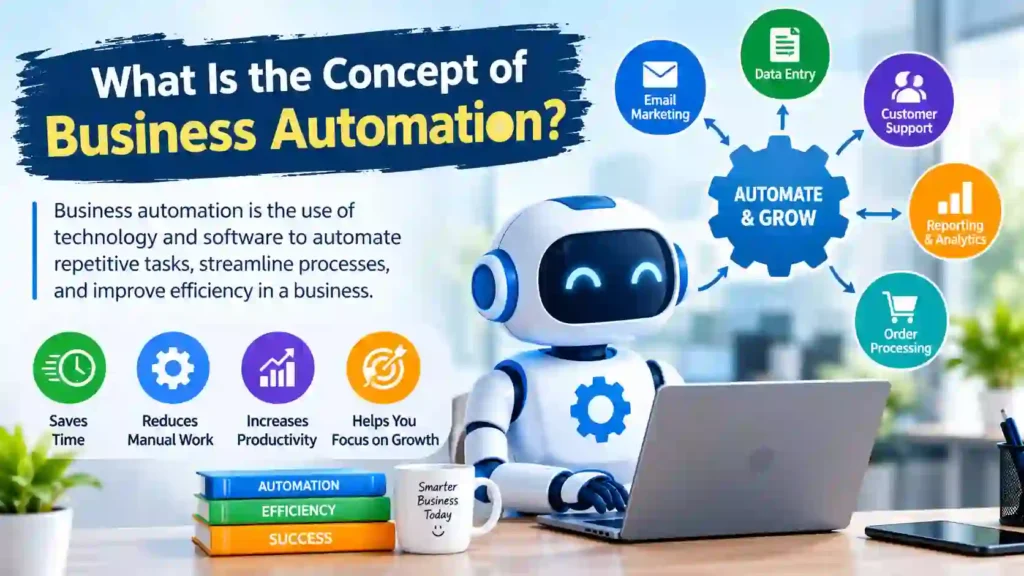
The concept of business automation focuses on using technology to complete repetitive business activities with less manual effort. The system follows predefined rules, triggers, or instructions to perform specific actions.
Consider a simple example. A customer submits a contact form on a website. Without automation, an employee may need to check the form, copy the information into a spreadsheet, send an email, and create a reminder for follow-up. With automation, these actions can happen through one connected workflow.
What Does a Business Automation Consultant Do?
A business automation consultant helps a company understand where automation can create the most value. The consultant does not simply recommend software. They examine the business process, understand its goals, and develop an automation approach that fits the company’s needs.
The work usually starts with a review of current operations. The consultant may examine how employees handle leads, customer communication, invoices, appointments, data entry, internal tasks, and other recurring activities.
After understanding the workflow, the consultant identifies tasks that consume unnecessary time or create avoidable errors. They then determine which processes can benefit from automation and which tasks still need human involvement.
Business Process Automation Consultants
Business process automation consultants focus specifically on improving repetitive business processes through technology. They look at how information moves through an organization and identify opportunities to make those workflows faster and more efficient.
For example, a consultant may examine a sales process and discover that employees manually transfer new leads from a website into a CRM. The consultant can recommend a workflow that sends new leads directly into the CRM and automatically assigns follow-up tasks.
Their work can include:
- Mapping existing business processes
- Identifying repetitive manual tasks
- Finding workflow bottlenecks
- Recommending suitable automation tools
- Connecting existing software
- Testing automated workflows
- Monitoring performance
- Improving processes over time
This process-focused approach helps small businesses automate areas where technology can provide a clear benefit instead of adding unnecessary tools.
Business Process Automation Consulting
Business process automation consulting takes a broader view of how different business activities work together. Instead of focusing on one isolated task, the consultant evaluates the complete workflow from beginning to end.
For instance, a customer order may involve sales, payment processing, inventory, invoicing, and customer communication. If employees manually manage every stage, delays and mistakes can occur. A consultant can examine the entire process and identify where automation can connect these activities.
Why Small Businesses Need Automation Consulting
Small businesses often work with limited employees, time, and resources. As the business grows, the number of daily tasks also increases. Employees may need to manage leads, respond to customers, send emails, create invoices, schedule meetings, update records, and complete administrative work.
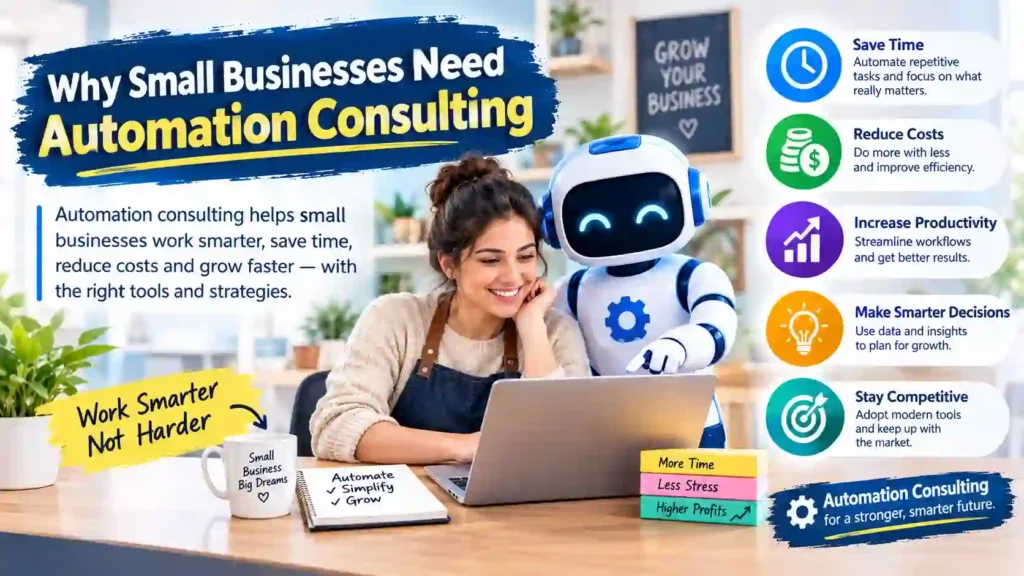
When teams handle these activities manually, repetitive work can consume a significant amount of time. Automation can reduce this workload, but businesses need to choose the right processes and tools. Small business automation consulting helps business owners make those decisions with a clear strategy.
A consultant can review the company’s current workflows and identify tasks that create delays or unnecessary manual work. Instead of automating everything, the consultant can prioritize processes that offer the greatest potential benefit.
Save Time on Repetitive Tasks
Repetitive tasks can take up valuable working hours. For example, employees may repeatedly enter customer information, send follow-up emails, update spreadsheets, or create routine reports.
Automation can handle these activities according to predefined rules. As a result, employees can spend more time on customer relationships, sales, strategy, and other important responsibilities.
Reduce Human Errors
Manual data entry and repetitive processes can lead to mistakes. An employee may enter incorrect information, forget a follow-up, or miss an important step in a workflow.
Automated systems can perform routine actions consistently. This can reduce avoidable errors and create more reliable business processes.
Support Business Growth
Small businesses need systems that can handle increasing workloads as they grow. Adding more customers does not always mean the company should add more manual work.
Automation can help businesses manage larger volumes of leads, customer requests, transactions, and internal tasks without increasing repetitive work at the same rate.
Make Better Use of Existing Software
Many small businesses already use several digital tools. The problem often comes from disconnected systems. Employees may need to copy information from one application into another.
A consultant can review the existing technology and identify opportunities to connect these tools. This approach can help businesses get more value from software they already pay for.
Which Business Processes Can You Automate?
Not every business process needs automation. The best opportunities usually involve repetitive, predictable, high-volume tasks that follow clear rules.
A consultant can examine different departments and determine which workflows can benefit most from automation. The right strategy depends on the company’s size, industry, goals, and existing technology.
Sales and Lead Management
Sales processes often contain several repetitive activities that businesses can automate.
For example, when someone submits a form on a website, an automated workflow can add the person’s information to a CRM, send a confirmation email, notify the sales team, and create a follow-up task.
Businesses can also automate:
- Lead capture
- Lead assignment
- Follow-up reminders
- CRM updates
- Appointment scheduling
- Sales notifications
- Customer onboarding
These workflows can help sales teams respond faster while reducing manual data entry.
Marketing and Customer Communication
Marketing teams frequently manage recurring communication tasks. Automation can help them deliver messages at the right time without requiring employees to perform every action manually.
Common examples include:
- Welcome email sequences
- Lead nurturing campaigns
- Customer reminders
- Email notifications
- Campaign updates
- Feedback requests
- Customer segmentation
For example, a new subscriber can automatically receive a welcome email. If the person interacts with the message, the system can trigger the next step in the customer journey.
Finance and Administrative Tasks
Finance and administration can also benefit from automation because these departments often handle repetitive data and documentation.
Businesses can automate tasks such as:
- Invoice creation
- Payment reminders
- Expense tracking
- Receipt collection
- Routine reports
- Data entry
- Internal notifications
Automation can help employees maintain consistent records while reducing the amount of time they spend on routine administrative work.
Customer Support
Customer support teams deal with recurring questions and requests. Automation can handle simple interactions while allowing employees to focus on more complex customer issues.
For example, an automated system can acknowledge a support request, categorize the ticket, assign it to the appropriate team member, and send status notifications.
Businesses can also use automation for:
- Support ticket routing
- Frequently asked questions
- Appointment reminders
- Customer notifications
- Feedback collection
- Follow-up messages
The goal is not to remove human support. Instead, automation can handle predictable steps so employees can focus on situations that require personal attention.
Internal Operations and Team Workflows
Automation can improve internal processes as well. Small businesses can use workflows to assign tasks, send notifications, update project records, and keep teams informed.
For example, when a sales employee closes a deal, an automated workflow can notify the finance team, create an onboarding task, update the CRM, and inform the relevant project team.
This type of workflow can reduce communication gaps and help different departments work together more efficiently.
How to Decide What to Automate First
Businesses should not try to automate every process at once. A better approach starts with tasks that are repetitive, time-consuming, and easy to standardize.
A consultant can evaluate each process based on factors such as:
- How often the task occurs
- How much employee time it requires
- How many manual steps it contains
- How often errors occur
- Whether the process follows clear rules
- Whether automation can produce measurable results
Starting with one or two high-impact workflows allows a small business to test the approach before expanding automation across other areas.
How Business Automation Consulting Works
Business automation consulting usually follows a structured process. The consultant first understands how the business operates, then identifies suitable automation opportunities and recommends solutions that match the company’s goals.
A good approach focuses on practical improvements rather than adding unnecessary technology. Business automation consulting for small businesses can start with a few high-impact workflows and expand their automation strategy as they see results.
1. Analyze Current Business Processes
The first step involves understanding how employees currently complete their daily tasks. The consultant reviews workflows, tools, communication methods, and manual processes.
For example, a consultant may examine how a business receives leads, records customer information, sends follow-up messages, processes invoices, or manages support requests.
This analysis helps identify repetitive tasks, unnecessary steps, delays, and areas where employees spend too much time on manual work.
2. Identify Automation Opportunities
After reviewing the existing processes, the consultant identifies tasks that could benefit from automation.
The best opportunities usually involve repetitive activities with clear rules. A consultant may prioritize processes that:
- Take significant employee time
- Occur frequently
- Require repetitive data entry
- Create avoidable errors
- Involve multiple software tools
- Follow predictable steps
The consultant can then rank these opportunities according to potential time savings, Business Automation Consulting for Small Businesses consultant impact, and implementation difficulty.
3. Choose the Right Automation Tools
The next step involves selecting technology that fits the business automation consultant requirements. The consultant considers the company’s existing software, budget, workflow complexity, and future growth.
For example, a business may already use a CRM, accounting platform, email marketing software, and project management tool. Instead of replacing everything, the consultant can look for ways to connect the existing systems.
Common automation solutions can include workflow automation platforms, CRM automation, AI tools, communication software, and application integrations.
4. Build and Test Automated Workflows
Once the business selects its approach, the consultant can create the required workflows and integrations.
For example, a new website lead could trigger several actions automatically:
- Add the lead to the CRM.
- Send a confirmation email.
- Notify the sales team.
- Create a follow-up task.
- Record the interaction.
Testing remains an important part of this stage. The consultant checks whether each action works correctly and looks for possible errors or gaps before the business relies on the workflow.
5. Monitor and Improve the Automation
Automation should not end after implementation. Businesses need to monitor their workflows and evaluate whether they produce the expected results.
A consultant can review factors such as time savings, error rates, response times, workflow performance, and employee feedback.
If a process creates unnecessary steps or does not work as expected, the business can adjust the workflow. Over time, new automation opportunities may also appear as the company grows.
AI Automation Consulting for Small Business
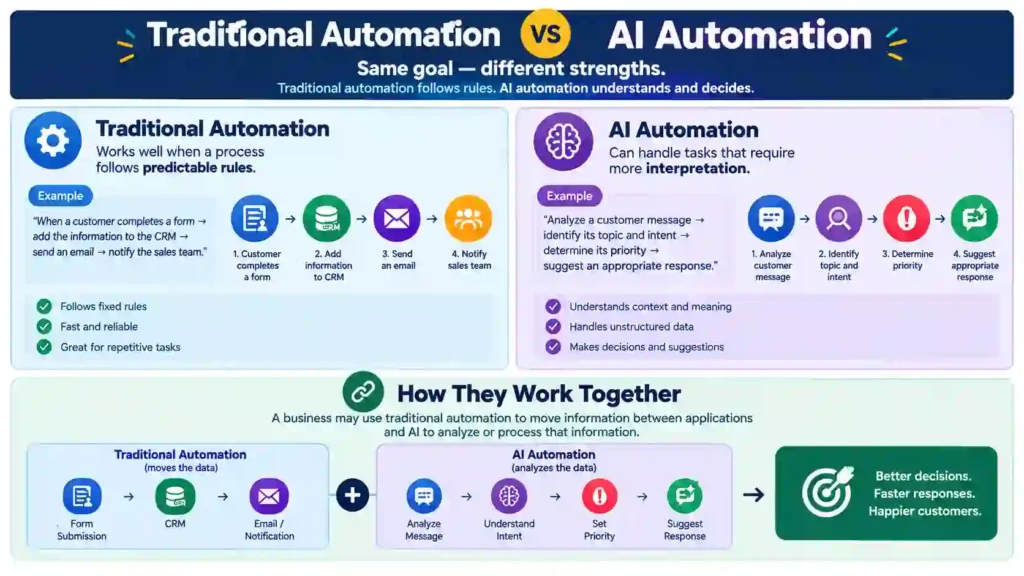
AI has expanded the possibilities of Business automation consulting. Traditional automation usually follows predefined rules, while AI can help systems analyze information, understand language, generate content, classify data, and support certain decisions.
AI automation consulting for small business
focuses on finding practical ways to use artificial intelligence within existing business processes. For example, a small business could use AI to classify incoming customer messages, summarize support conversations, analyze customer feedback, generate draft responses, or help qualify leads.
However, businesses should not use AI simply because it is popular. The technology should solve a specific business problem and provide a measurable benefit.
Where Small Businesses Can Use AI Automation
Small businesses can explore AI automation in several areas.
- Customer Support: AI can categorize incoming requests, summarize conversations, and suggest responses.
- Sales: AI can help analyze leads, summarize customer interactions, and identify potential high-value prospects.
- Marketing: AI can assist with content drafts, customer segmentation, campaign analysis, and personalized communication.
- Data Analysis: AI tools can help businesses identify patterns in customer feedback, sales information, or operational data.
- Administrative work: AI can summarize documents, extract information, and organize certain types of business data.
The right use case depends on the Business automation consulting and the type of information it handles.
Best AI Consulting Firms for Business Process Automation
Business automation consulting looking for AI solutions should evaluate consulting firms based on their ability to understand business processes rather than focusing only on AI technology.
A suitable AI consulting firm should understand workflow automation, software integrations, data security, and the company’s specific business goals.
Before choosing a firm, businesses can consider:
- Experience with similar business processes
- AI and automation expertise
- Integration capabilities
- Data security practices
- Clear project scope
- Expected business outcomes
- Ongoing support
A good consultant should explain what the AI solution will accomplish, which processes it will improve, and how the business can measure its results.
For small businesses, practical implementation matters more than adopting the most advanced AI system available. A simple AI workflow that solves a real problem can provide more value than a complex system that employees rarely use.
Common Business Automation Challenges and How to Overcome Them
Business automation can improve efficiency, but poor planning can create new problems. Business automation consulting for Small businesses should understand the common challenges before implementing automated workflows.
Choosing the Wrong Processes
Not every business task needs automation. Automating a process that rarely occurs or requires frequent human judgment may not provide enough value.
Start with repetitive, time-consuming tasks that follow clear steps. This approach makes it easier to measure the results and expand automation later.
Poor Tool Integration
Businesses often use multiple applications for different activities. If these tools do not connect properly, employees may still need to move information manually.
Before selecting an automation solution, check whether it works with the software your business already uses. A consultant can help identify suitable integrations and avoid unnecessary tool replacements.
Employee Resistance
Employees may hesitate to use new Business Automation Consulting for Small Businesses workflows if they do not understand how the system works or why the business introduced it.
Explain the purpose of the automation and show employees how it will reduce repetitive work. Proper training can make the transition easier and encourage employees to use the new system correctly.
Lack of Monitoring
An automated workflow can still experience errors or become outdated as the business changes. Regular monitoring helps identify problems before they affect customers or employees.
Review important workflows periodically and update them when business requirements, software, or processes change.
FAQs About Business Automation Consulting
What Is a Business Automation Consultant?
A business automation consultant helps businesses identify processes that technology can improve or automate. They analyze existing workflows, find repetitive tasks, recommend suitable tools, and help design or implement automated processes.
For small businesses, a consultant can focus on high-impact workflows such as lead management, customer communication, invoicing, scheduling, and internal operations.
The main goal is to reduce unnecessary manual work while improving efficiency and consistency.
What Are the 4 Types of Automation?
The four common types of automation include robotic process automation (RPA), workflow automation, intelligent automation, and AI-powered automation.
- Robotic Process Automation (RPA) uses software bots to perform repetitive, rule-based tasks such as data entry and transferring information between systems.
- Workflow automation connects different steps in a business process. For example, a new customer inquiry can automatically create a CRM record and notify a sales representative.
- Intelligent automation combines automation with technologies that can analyze information and support more complex processes.
- AI-powered automation uses artificial intelligence to handle tasks involving language, classification, predictions, content generation, or other forms of data interpretation.
Businesses can use one type or combine several approaches depending on their needs.
What Is the Concept of Business Automation?
Business Automation Consulting for Small Businesses means using technology to perform repetitive business tasks with less manual effort. Automated systems can follow predefined rules or use AI to process information and trigger actions.
For example, when a customer places an order, automation can update the order system, send a confirmation email, notify the relevant team, and create related tasks.
The concept focuses on making business processes more efficient while allowing employees to spend more time on activities that require human judgment and creativity.
Is Business Automation Useful for Small Businesses?
Yes. Small businesses can use automation to manage repetitive work without constantly increasing manual workload.
Common opportunities include lead follow-ups, appointment reminders, invoicing, customer emails, data entry, and task management.
The key is to start with processes that provide a clear business benefit rather than trying to automate everything at once.
What Processes Should a Small Business Automate First?
A Business Automation Consulting for Small Businesses should usually start with repetitive and predictable processes that consume significant employee time.
Examples include lead capture, email follow-ups, appointment scheduling, invoice reminders, customer notifications, and routine data entry.
Businesses should evaluate the time required, frequency, error rate, and potential savings before choosing a process. Starting with one or two high-impact workflows can make implementation easier and provide measurable results.
Conclusion
Business automation consulting can help small businesses turn repetitive manual processes into efficient, connected workflows. Instead of adding technology without a clear purpose, businesses can first identify their biggest operational challenges and then choose automation solutions that address those problems.
A consultant can analyze existing processes, identify automation opportunities, select suitable tools, build workflows, and monitor their performance. Small businesses can apply automation to sales, marketing, finance, customer support, and internal operations.
AI also creates new opportunities for businesses that need more advanced automation. However, the best solution is not always the most complex one. Businesses should focus on practical tools that solve genuine problems and produce measurable results.
By starting with high-impact processes and improving workflows gradually, small businesses can save time, reduce errors, improve customer experiences, and create stronger systems for long-term growth.