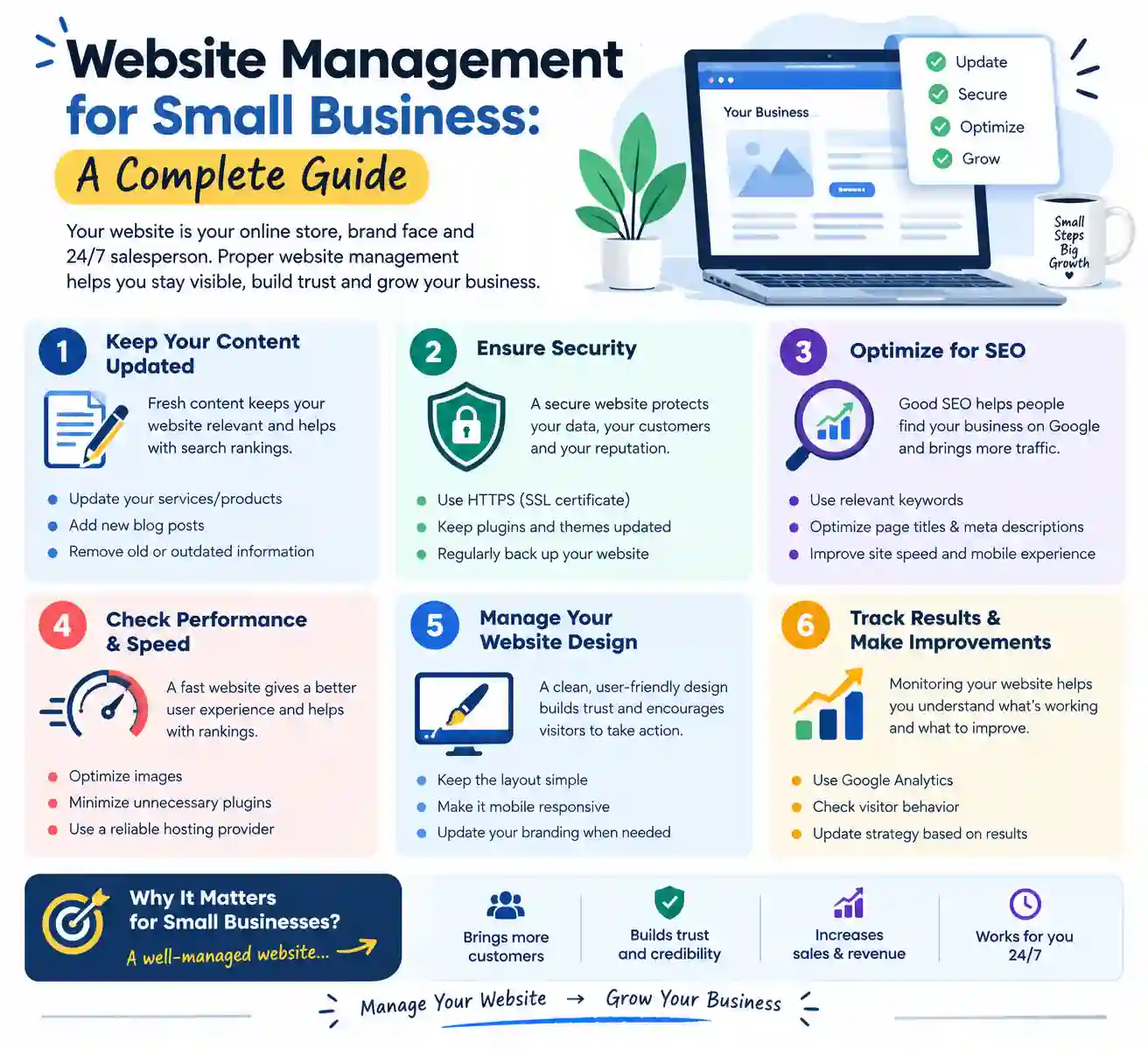
Website management for small business involves maintaining and improving your website so it continues to support your business goals. From updating content and checking website performance to managing security and improving search engine visibility, regular website management helps you provide a better experience for visitors.
Whether you run a local shop, a service-based business, or an online store, understanding website management can help you avoid common problems and make better use of your online presence. In this guide, you will learn what website management means, what it includes, how to manage a small business website step by step, which tools can help, and how much professional website management may cost.
1. What Is Website Management for Small Business?
Website management for small business is the ongoing process of maintaining, monitoring, updating, and improving a business website. It includes technical tasks, content updates, security checks, search engine optimization (SEO), and performance monitoring.
The main goal is to ensure that your website works properly and provides useful information to visitors. A well-managed website can help customers find your business, understand your offerings, and contact you when they need your products or services.
Website Management vs. Website Maintenance
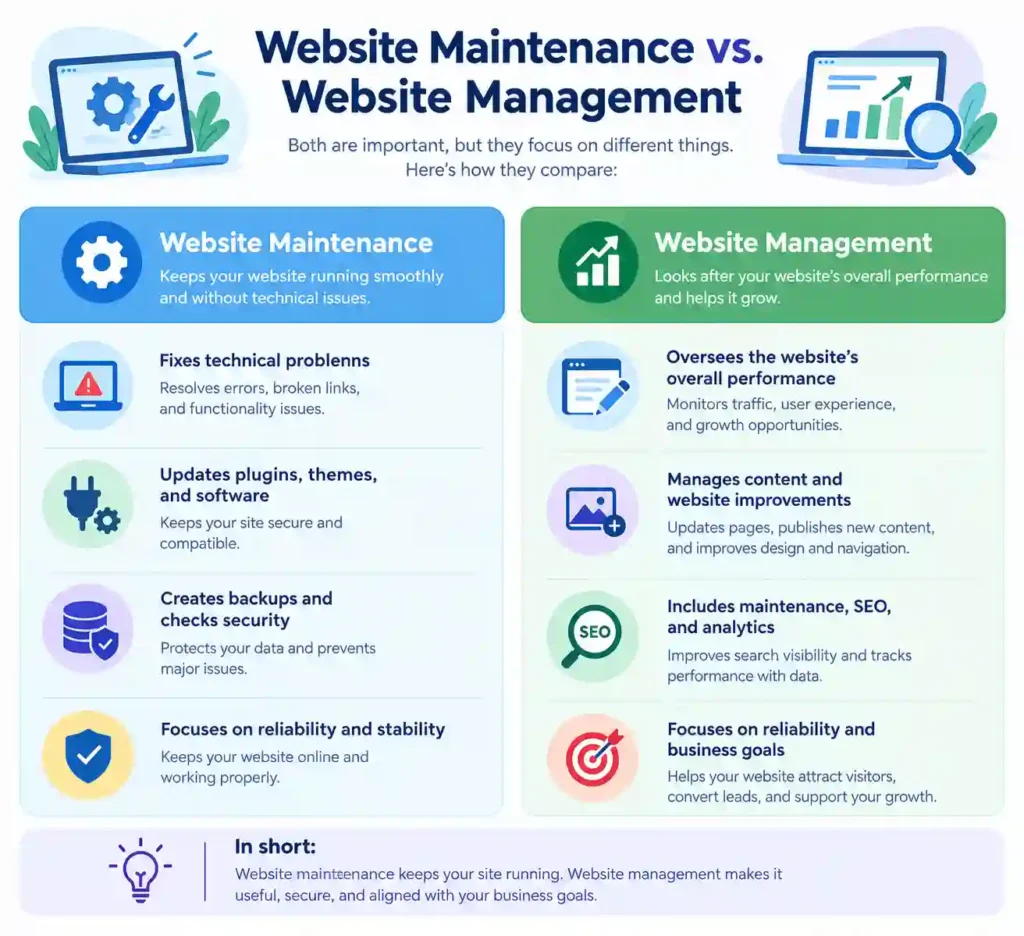
Website focuses mainly on keeping a website technically functional. It includes installing software updates, fixing broken links, creating backups, checking security, and resolving technical errors.
Website management covers a broader range of activities. Along with maintenance, it may include content planning, SEO improvements, user experience optimization, analytics, and updates to business information.
Here are the main differences:
For most small businesses, both activities are important. Maintenance helps prevent technical issues, while ongoing management ensures that the website remains useful, relevant, and aligned with business needs.
Why Small Businesses Need Website Management
A website management often creates the first impression customers have of your business. If pages load slowly, contact details are outdated, or important links do not work, visitors may leave before learning about your services.
Here are some important benefits:
- Builds customer trust: Updated information, working contact forms, and professional pages help visitors feel more confident about your business.
- Improves user experience: Clear navigation and mobile-friendly pages make it easier for customers to find what they need.
- Supports SEO: Relevant content, accessible pages, and good technical health help search engines discover and understand your website.
- Reduces technical risks: Regular updates, backups, and security checks can help prevent avoidable problems.
- Keeps information accurate: Customers can find current prices, services, opening hours, and contact details.
- Supports business growth: A well-maintained website gives you a stronger foundation for marketing campaigns and lead generation.
Website management does not guarantee higher rankings or more sales. However, it helps create a reliable online experience and gives your business a better opportunity to reach its goals.
2. What Does Small Business Website Management Include?
Small business website management includes several ongoing tasks. The exact requirements depend on your website platform, business type, and available resources.
Some businesses may only need occasional content updates and basic maintenance. Others, such as e-commerce stores, may require frequent product updates, payment checks, inventory management, and more detailed security monitoring.
Website Hosting, Domain, and SSL Management
Your domain name, hosting service, and SSL certificate are essential parts of your website.
Your domain is the address visitors use to reach your website. Hosting stores your website’s files and makes them accessible online. An SSL certificate enables an encrypted connection between your website and its visitors, typically shown by HTTPS in the browser address bar.
To manage these elements effectively:
- Renew your domain before it expires.
- Review your hosting plan to ensure it meets your website’s needs.
- Monitor uptime and investigate repeated outages.
- Make sure HTTPS works correctly across important pages.
- Check that your SSL certificate renews successfully.
- Keep your domain registrar and hosting account details secure.
Reviewing these essential services regularly helps reduce disruptions and keeps your website accessible to potential customers.
Content Updates and Website Backups
Your website content should reflect your current business, not outdated information from months or years ago.
Follow these practical steps:
- Set up automatic backups where your hosting provider or website platform supports them.
- Keep backups in a secure location separate from your live website when possible.
- Choose a backup schedule based on how frequently your website changes.
- Test the restoration process periodically.
- Confirm that backups include the important files and database information needed to restore your website.
A brochure-style website with few changes may need less frequent backups than an online store that processes orders every day. Choose a schedule that matches the importance and frequency of your Website management updates.
Security Updates and Bug Fixes
Website security should be part of your regular management routine. Outdated software, weak passwords, insecure configurations, and vulnerable plugins can expose your website to unnecessary risks.
You should also:
- Use strong, unique passwords for administrator accounts.
- Enable two-factor authentication where available.
- Remove unused themes and plugins when they are no longer needed.
- Limit administrator access to trusted people.
- Monitor security alerts and suspicious activity.
- Check important forms, buttons, and links after updates.
Bug fixes are another important part of website management. A broken contact form, an error on a service page, or a malfunctioning mobile menu can prevent visitors from taking action.
3. How to Manage a Small Business Website: Step-by-Step
Managing a business website becomes easier when you follow a clear process. Instead of waiting for something to break, create a routine for updating content, checking performance, improving SEO, and protecting your website.
You do not need advanced technical skills to handle every task. Many website builders and content management systems provide simple tools for managing pages, publishing articles, and reviewing website activity.
Here are the essential steps to follow.
Choose the Right CMS or Website Builder
The first step is choosing a platform that matches your business needs, technical skills, and budget. A content management system (CMS) allows you to create, edit, organize, and publish website content without building every page from scratch.
WordPress is a popular option for businesses that want flexibility, blogging features, and access to a wide range of plugins. Website builders such as Wix and Squarespace may suit business owners who prefer a more guided setup process.
Before selecting a platform, consider these factors:
- Ease of use: Choose a platform you can manage without unnecessary difficulty.
- Customization: Check whether you can adjust layouts, colors, menus, and page designs.
- SEO features: Look for options to edit page titles, meta descriptions, URLs, and image alt text.
- Security and updates: Understand how the platform handles software updates and security.
- Scalability: Make sure it can support your business as your website grows.
- Total cost: Consider hosting, domain renewal, premium themes, plugins, and other recurring expenses.
Choose a platform that meets your current requirements without making everyday website management unnecessarily complicated.
Create and Update Useful Content
Your website should answer the questions customers have before they contact you or purchase your products. Clear, helpful content makes it easier for visitors to understand what you offer and decide whether your business meets their needs.
For effective content management:
- Identify the questions your customers ask most often.
- Research relevant keywords before planning new articles.
- Organize information with descriptive headings and short paragraphs.
- Add relevant internal links to related pages and blog posts.
- Review older content for outdated facts, broken links, and missing information.
- Include a useful next step, such as contacting your business or reading a related guide.
Avoid publishing content simply to increase the number of pages on your website. Each page should provide a clear benefit to readers.
Monitor Website Performance and Traffic
Google Analytics 4 (GA4) provides information about website users and their interactions. Google Search Console helps you understand how your website performs in Google Search, including search queries, clicks, impressions, indexing information, and certain technical issues.
When reviewing your website, pay attention to:
- Organic traffic: How many visitors arrive through unpaid search results?
- Search impressions: How often do your pages appear in Google Search?
- Click-through rate (CTR): What percentage of impressions result in clicks?
- Engagement: Are visitors interacting with important pages and content?
- Conversions: Are visitors completing useful actions, such as submitting forms or making purchases?
- Technical performance: Are pages accessible, mobile-friendly, and reasonably fast?
Do not judge your website’s success using traffic alone. A smaller number of relevant visitors may generate more qualified leads than a large number of visitors who have no interest in your services.
4. Essential Website Management Tasks
A reliable website management routine helps you identify problems before they affect too many visitors. Some tasks require attention every day, while others can be completed weekly or monthly.
The right schedule depends on your website’s size, activity, and business importance. An online store may require daily order and payment checks, whereas a simple business website may need only occasional content changes.
Daily, Weekly and Monthly Website Checks
Organizing tasks by frequency makes website management easier to handle, especially when you have limited time.
Daily tasks
For websites that receive regular inquiries or transactions, check the functions that directly affect customers.
- Review important customer inquiries and order notifications.
- Check whether essential pages and checkout functions work correctly.
- Investigate any security alerts or unexpected website downtime.
- Confirm that critical business information remains accurate when changes occur.
You may not need to perform every check manually every day. Monitoring services and automated notifications can help you identify urgent problems.
Weekly tasks
Set aside time each week to review the website’s main functions and recent changes.
- Test contact forms, important buttons, and navigation links.
- Review newly published content for errors.
- Check for available software and plugin updates.
- Review backup status.
- Look for broken links or unusual website behavior.
- Review important traffic and search performance trends.
Monthly tasks
Monthly reviews help you assess the website’s overall condition and identify opportunities for improvement.
- Review Google Analytics and Search Console reports.
- Update outdated pages and service information.
- Check mobile usability and page loading performance.
- Review user accounts and administrator permissions.
- Confirm that backups can be restored.
- Review SEO titles, meta descriptions, and internal links.
- Evaluate whether the website is helping achieve your business goals.
Not every task needs the same frequency. Security alerts should be addressed promptly, and critical updates should be assessed when available. Avoid delaying important fixes just because your next monthly review has not arrived.
Mobile Responsiveness and Navigation
Many customers browse websites on smartphones and tablets. If your website is difficult to read or navigate on a small screen, visitors may struggle to find information or contact your business.
To improve the mobile experience:
- Use a responsive theme or design.
- Choose readable font sizes and sufficient spacing.
- Make buttons large enough to tap comfortably.
- Keep navigation menus simple and organized.
- Avoid intrusive pop-ups that cover important content.
- Compress images to reduce unnecessary loading time.
- Test forms and other interactive elements on mobile devices.
Navigation is equally important. Visitors should be able to understand where they are and how to reach important pages without unnecessary clicks. Test your website on different screen sizes and browsers. A page that looks correct on your own computer may still have layout issues on another device.
5. Best Website Management Tools for Small Businesses
The right tools can save time, simplify routine tasks, and help you make informed decisions. You do not need to install dozens of applications. Start with tools that address your most important needs, then add others when a clear requirement arises.
CMS and Website Maintenance Tools
Your website platform provides the foundation for everyday management. WordPress, for example, lets you manage pages, blog posts, media files, themes, plugins, and user permissions from one dashboard.
Here are several useful options:
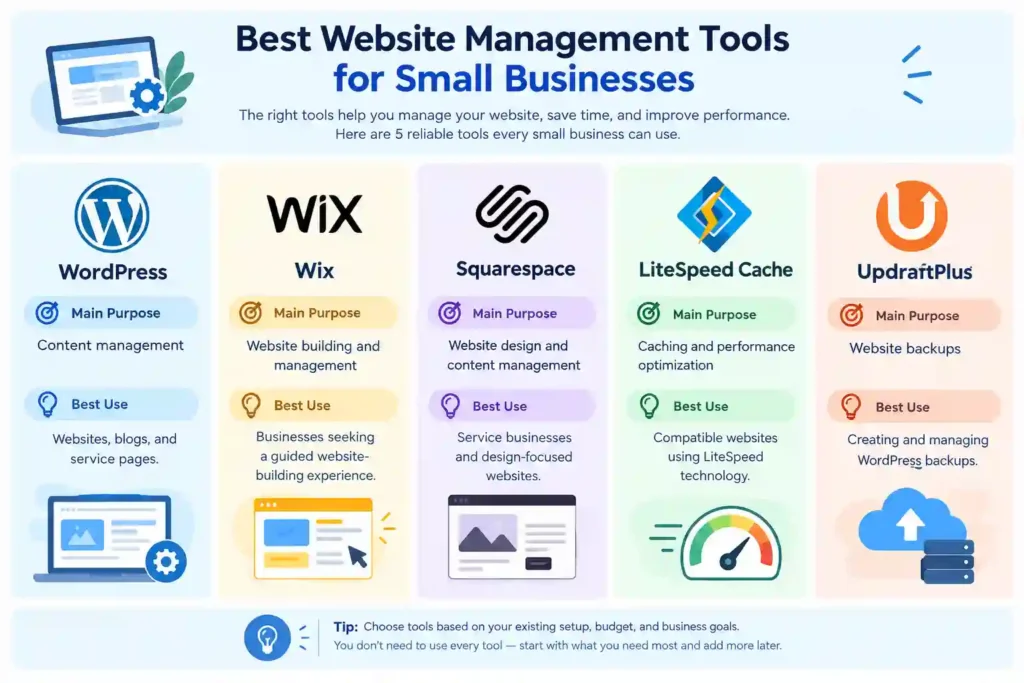
Choose tools based on your existing setup. For example, if your hosting environment supports LiteSpeed, its caching plugin may help improve performance when configured correctly. However, using multiple overlapping caching plugins can create conflicts.
Similarly, a backup plugin can be useful for WordPress, but you should check whether your hosting provider already supplies a suitable backup service before adding another solution.
SEO, Analytics and Security Tools
SEO, analytics, and security tools help you understand website performance, improve search visibility, and identify potential problems.
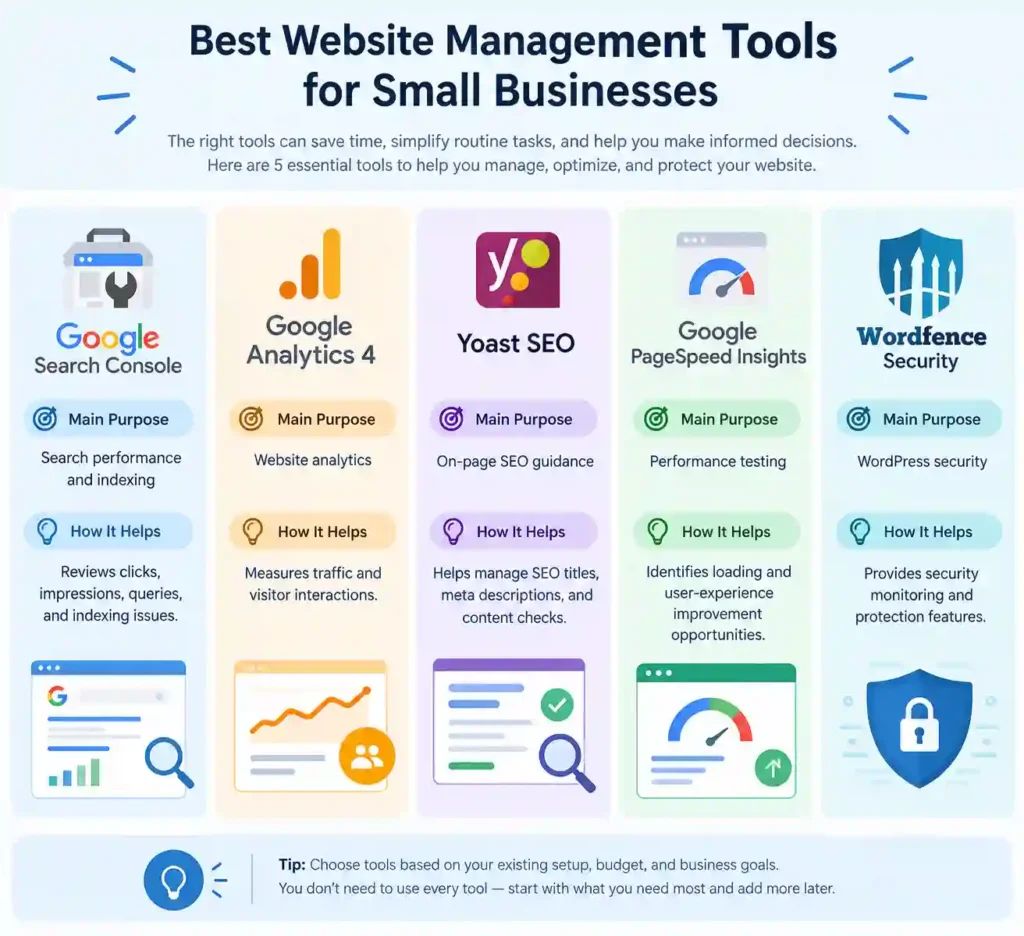
You can begin with Google Search Console and Google Analytics 4 to understand your website’s search performance and visitor activity. PageSpeed Insights can help identify performance issues, while an SEO plugin can support on-page optimization.
Security tools can add useful protection, but no single plugin guarantees complete security. Keep your software updated, use strong passwords, maintain backups, and restrict unnecessary administrator access.
6. Website Management for Small Business SEO
Search engine optimization (SEO) helps search engines understand your website and helps potential customers discover your business through relevant search queries. Effective website management for small business SEO involves improving content, organizing website pages, monitoring indexing, and maintaining a positive user experience.
SEO is an ongoing process rather than a one-time task. Search trends, customer needs, competitors, and search engine systems can change over time. Regular reviews help you identify issues and improve your website based on reliable information.
Keyword Research and On-Page Optimization
Keyword research helps you understand the words and phrases people use when searching for your products or services. Choosing relevant keywords allows you to create content that matches what your audience wants to know.
Use these practices to improve on-page SEO:
- Choose a relevant focus keyword: Select a phrase that accurately describes the page and matches its search intent.
- Write descriptive SEO titles: Make titles clear, useful, and relevant to the page content.
- Create helpful meta descriptions: Summarize the page and explain why someone might want to visit it.
- Organize headings logically: Use H1 for the main page heading and H2/H3 headings to structure related topics.
- Add internal links: Connect relevant pages to help visitors discover related information.
- Optimize images: Use descriptive file names, suitable image sizes, and meaningful alt text when appropriate.
- Keep URLs readable: Use short, descriptive URLs that reflect the page topic.
Avoid repeating the same keyword unnaturally. Use related terms when they help explain the subject, and prioritize useful information over keyword density.
Website Speed, Image Optimization and Indexing
Website speed affects how quickly visitors can access your content. Slow pages can frustrate users, particularly those browsing on mobile devices or slower internet connections. Google PageSpeed Insights can help you identify performance opportunities. Review its recommendations and prioritize issues that meaningfully affect real users instead of trying to achieve a perfect score at any cost.
Use Google Search Console to:
- Inspect important URLs and check their indexing status.
- Identify accidental noindex directives.
- Check whether robots.txt rules block important resources or pages.
- Review your XML sitemap for errors.
- Find and fix broken internal links.
- Improve internal linking to important pages.
- Request indexing for eligible updated URLs when appropriate.
Remember that a sitemap and an indexing request can help Google discover content, but neither guarantees indexing or higher rankings. Focus on publishing useful content, maintaining sound technical SEO, and monitoring the results over time.
7. How Much Does Website Management Cost?
Website management costs vary depending on your website’s size, platform, complexity, and required services. A simple informational website usually requires less ongoing work than an online store with hundreds of products, frequent orders, and complex integrations.
Your budget should account for both recurring expenses and occasional professional assistance.
DIY Costs vs. Professional Website Management Services
Managing your website yourself can reduce service fees, but it requires time to learn the platform, perform updates, review analytics, and resolve common issues.
Professional website management services may include technical maintenance, backups, security monitoring, content updates, SEO support, and performance optimization. Not every provider includes all these services in the same package, so review the scope carefully.
The following figures are illustrative budgeting estimates in US dollars, not verified market quotes. Actual prices vary by provider, location, and service level.
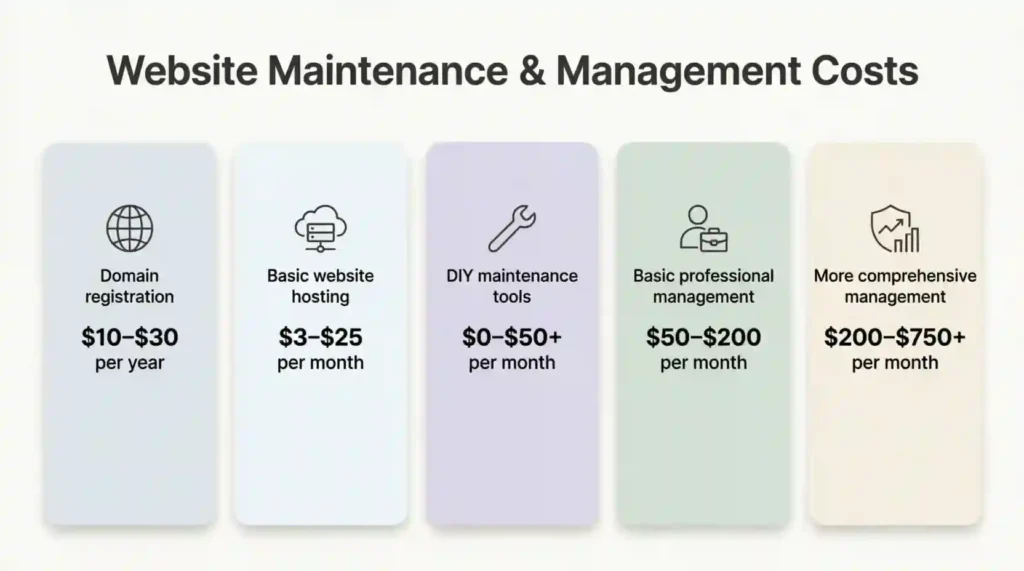
These estimates exclude some potential expenses, such as premium themes, major redesigns, custom development, e-commerce transaction fees, and extensive SEO campaigns.
Before choosing a package, ask what the price includes. Does the provider handle backups, security updates, content changes, uptime monitoring, and technical support? Are there limits on monthly edits? Are emergency fixes charged separately?
A low monthly price may be suitable for basic maintenance, but it should not be assumed to include comprehensive SEO or ongoing content production.
8. DIY Website Management vs. Hiring a Professional
Small business owners can either manage their websites themselves or hire a professional. The right choice depends on your technical confidence, available time, budget, and the complexity of your website.
- DIY website management is often suitable for small websites with straightforward requirements. You can update pages, publish blog posts, review analytics, and perform basic checks using accessible tools and tutorials.
- However, learning every technical task takes time. Complex errors, security incidents, and major performance problems may require specialist support.
- Professional website management: can be helpful when you have limited time or depend heavily on your website for leads and sales. A professional may also identify technical issues that are difficult to diagnose without experience.
- Consider these differences: You do not necessarily have to choose only one option. A hybrid approach can work well: manage everyday content and basic monitoring yourself while hiring a professional for security reviews, technical fixes, or more advanced SEO.
| Factor | DIY Management 🔵 | Professional Management 🟢 |
| 💰 Direct Cost | Usually lower | Requires service fees |
| ⏰ Time Commitment | Higher personal involvement | Less routine work for the owner |
| 🧠 Technical Expertise | Depends on your skills | Access to specialist knowledge |
| ⚙️ Control | Direct control over changes | Depends on the service agreement |
| ❓ Complex Problems | May require outside help | Can be handled if included in the service |
Before hiring anyone, request a clear list of deliverables, response times, reporting arrangements, and fees. Make sure you retain appropriate access to your domain, hosting, website, and analytics accounts.
9. Common Website Management Mistakes to Avoid
Even a well-designed website can underperform when basic management tasks are neglected. Recognizing common mistakes helps you protect your website and provide a better experience for customers.
- Ignoring software updates: Outdated software can create compatibility and security problems. Review updates regularly and create backups before major changes.
- Neglecting website backups: Without reliable backups, recovering from accidental changes or technical failures may become difficult. Keep backups in a secure location and test restoration periodically.
- Publishing outdated information: Incorrect prices, expired offers, and old contact details can confuse visitors. Review important business information whenever circumstances change.
- Ignoring mobile usability: A website that works well on desktop computers may still have difficult menus, unreadable text, or poorly displayed forms on mobile devices. Test important pages on different screen sizes.
- Overloading the website with plugins: Too many plugins can increase maintenance demands and create compatibility issues. Keep only the tools you need and review them periodically.
- Focusing only on traffic: More visitors do not automatically mean more customers. Track meaningful outcomes, such as inquiries, bookings, qualified leads, and purchases.
- Using keywords unnaturally: Excessive keyword repetition can make content difficult to read. Write naturally and use keywords where they accurately describe the topic.
- Failing to monitor indexing: Important pages may remain undiscovered or excluded from search results because of technical settings or other issues. Review Google Search Console regularly.
- Making changes without testing: A theme update or design change may affect forms, navigation, or page layouts. Check important functions after significant changes.
Avoiding these mistakes will not guarantee rankings or sales, but it can make your website more reliable and easier to manage.
10. How to Improve Your Small Business Website Over Time
Website management works best when you treat improvement as an ongoing process. Instead of making random changes, use customer feedback, analytics, and technical checks to decide what deserves attention first.
Start by identifying your most important business goal. You might want more inquiries, better local visibility, increased online sales, or improved customer support.
Then follow a simple improvement plan:
- Review your key pages: Make sure your homepage, service pages, and contact information accurately represent your business.
- Check technical health: Review backups, security, broken links, mobile usability, and page speed.
- Analyze search performance: Use Search Console to identify relevant queries, impressions, clicks, and indexing issues.
- Improve existing content: Update outdated information and add useful details where they genuinely help readers.
- Make navigation clearer: Help visitors reach important pages with fewer unnecessary steps.
- Track business results: Measure inquiries, purchases, bookings, or other actions that matter to your business.
- Repeat the process: Review results regularly and prioritize the next improvement
Make one meaningful change at a time when possible, then observe the results. This approach helps you understand which improvements are useful instead of relying on assumptions.
Frequently Asked Questions
What does website management include?
Website management includes content updates, software maintenance, backups In addition, security checks, performance monitoring, SEO improvements, and general website troubleshooting Moreover. The exact tasks depend on the website’s size and business requirements.
How much does website management cost for a small business?
Costs depend on the services you need and the provider you choose. Basic DIY management may require only domain, hosting, and selected tool expenses, while professional services can cost from tens to hundreds of dollars per month or more. Request a detailed quote before committing to a package.
Can I manage my small business website myself?
Yes. Many small business owners can manage basic websites themselves using platforms such as WordPress, Wix, or Squarespace. You can update content, publish articles, and review website performance without advanced coding skills. For complex technical issues or security incidents, professional assistance may be appropriate.
How often should I update my business website?
First Update business information whenever it changes. Review important website functions regularly, Next check software updates and backups according to your maintenance routine, and evaluate SEO and analytics at least monthly. Website management with frequent transactions or critical customer functions may need more frequent monitoring.
What are the best website management tools for small businesses?
Useful tools include Website Management for Small Business for content management, Google Search Console for search performance, Google Analytics 4 for visitor analysis, PageSpeed Insights for performance testing, and appropriate backup and security solutions. The best combination depends on your platform, budget, and business goals.
Conclusion
Website management for small business is about more than keeping a website online. It involves maintaining security, updating useful content, improving user experience, monitoring performance, and ensuring that your website continues to support your business goals.
You can begin with a simple routine: keep your software updated, maintain reliable backups, review important pages, monitor search performance, and fix issues when they arise. As your needs grow, consider professional support for tasks that require more advanced technical or SEO expertise.